<?xml version="1.0" encoding="utf-8"?><?xml-stylesheet type="text/xsl" href="atom.xsl"?>
<feed xmlns="http://www.w3.org/2005/Atom">
    <id>https://fmd-foss.org/blog</id>
    <title>FMD Blog</title>
    <updated>2026-09-18T00:00:00.000Z</updated>
    <generator>https://github.com/jpmonette/feed</generator>
    <link rel="alternate" href="https://fmd-foss.org/blog"/>
    <subtitle>FMD Blog</subtitle>
    <icon>https://fmd-foss.org/img/favicon.ico</icon>
    <entry>
        <title type="html"><![CDATA[FMD Server API v2]]></title>
        <id>https://fmd-foss.org/blog/2026/09/18/api-v2</id>
        <link href="https://fmd-foss.org/blog/2026/09/18/api-v2"/>
        <updated>2026-09-18T00:00:00.000Z</updated>
        <summary type="html"><![CDATA[FMD Android 0.17.0 and]]></summary>
        <content type="html"><![CDATA[<p><a href="https://gitlab.com/fmd-foss/fmd-android/-/releases/v0.17.0" target="_blank" rel="noopener noreferrer" class="">FMD Android 0.17.0</a> and
<a href="https://gitlab.com/fmd-foss/fmd-server/-/releases/v0.17.0" target="_blank" rel="noopener noreferrer" class="">FMD Server 0.17.0</a>
introduce the new API v2, modernising both the REST API and the end-to-end encryption.</p>
<p>These releases completely rewrite the REST API code and the associated end-to-end encryption code.
These changes cover three platforms (Android, web, backend) and touch the heart of FMD Server as a transport channel.</p>
<p>The old API v1 code continues to be available in parallel, for backwards compatibility.
It is deprecated and will be removed in a future FMD Android 1.0 and FMD Server 1.0 release.</p>
<h2 class="anchor anchorTargetStickyNavbar_iM01" id="motivation-why-rewrite-the-api">Motivation: Why rewrite the API?<a href="https://fmd-foss.org/blog/2026/09/18/api-v2#motivation-why-rewrite-the-api" class="hash-link" aria-label="Direct link to Motivation: Why rewrite the API?" title="Direct link to Motivation: Why rewrite the API?" translate="no">​</a></h2>
<p>Why go to such lengths and invest so much time into an internal rewrite?</p>
<p>There are two aspects to this, both of which have their problems that need fixing:</p>
<ol>
<li class="">
<p><strong>REST API:</strong></p>
<p>The existing API v1 has grown over time, with many patches added to it, and no documentation.
It can hardly be called "REST" anymore.
For example, uploading a location is done by <code>POST /api/v1/location</code>, getting a location is done via <code>PUT /api/v1/location</code>.
This is confusing for developers.</p>
</li>
<li class="">
<p><strong>Cryptography:</strong></p>
<p>FMD Server aims to be <a class="" href="https://fmd-foss.org/docs/fmd-server/security">end-to-end encrypted</a>,
so that server operators cannot see users' locations or execute commands on users' devices.</p>
<p>The existing cryptography (called the <em>FMD Server Protocol</em>) was designed ad-hoc in the early days of FMD
and was never documented or formally analysed.
Consequently, the protocol v1 makes certain "interesting" choices,
such as using RSA where AES would have been enough,
and re-using a single key for both signing and decrypting.
More importantly, protocol v1 is vulnerable to an active adversary inserting malicious location data
that cannot be distinguished from honest data.
(That said, if you care about an actively malicious server,
you <a href="https://cronokirby.com/posts/end-to-end-encryption-in-web-apps.html" target="_blank" rel="noopener noreferrer" class="">should not be using a web client.</a>)</p>
</li>
</ol>
<h2 class="anchor anchorTargetStickyNavbar_iM01" id="whats-new-in-api-v2">What's new in API v2?<a href="https://fmd-foss.org/blog/2026/09/18/api-v2#whats-new-in-api-v2" class="hash-link" aria-label="Direct link to What's new in API v2?" title="Direct link to What's new in API v2?" translate="no">​</a></h2>
<p>Doing a redesign from scratch allowed us to implement a number of improvements:</p>
<ol>
<li class="">
<p><strong>REST API:</strong></p>
<ul>
<li class="">Streamlined the API endpoints and made them more REST-like.
GET, POST, DELETE are now all used in a sensible way.</li>
<li class="">Proper <a href="https://gitlab.com/fmd-foss/fmd-server/-/blob/master/backend/openapi-v2.yaml" target="_blank" rel="noopener noreferrer" class="">API specification</a> using OpenAPI, with a Swagger UI to explore it.
The UI is hosted on every server at <code>/swagger-ui</code>, for example, <a href="https://server-edge.fmd-foss.org/swagger-ui" target="_blank" rel="noopener noreferrer" class="">https://server-edge.fmd-foss.org/swagger-ui</a>.</li>
<li class="">New feature: server caches a list of pending commands (not just the latest one)</li>
<li class="">New feature: server caches a list of server event messages,
such as "account locked due to failed login attempts" (not just the latest one)</li>
</ul>
</li>
<li class="">
<p><strong>Cryptography</strong></p>
<ul>
<li class="">FMD Server Protocol v2 with modern algorithms and good design patterns
(such as context binding and key separation)</li>
<li class="">Fixed the known vulnerabilities (these only apply to an actively malicious server, not a passive one)</li>
<li class=""><a href="https://gitlab.com/fmd-foss/server-protocol" target="_blank" rel="noopener noreferrer" class="">Formal documentation</a> of the protocol</li>
</ul>
</li>
</ol>
<p>Additionally, both the REST API v2 and the FMD Server Protocol v2 have been made
<strong>extensible</strong> by being generic over the data type.
Currently, "location" and "picture" are the only data types.
But the new design makes it possible to add additional data types, such as "Bluetooth scan" or "free text".</p>
<div class="theme-admonition theme-admonition-info admonition_HcNj alert alert--info"><div class="admonitionHeading_iVMi"><span class="admonitionIcon_NFEK"><svg viewBox="0 0 14 16"><path fill-rule="evenodd" d="M7 2.3c3.14 0 5.7 2.56 5.7 5.7s-2.56 5.7-5.7 5.7A5.71 5.71 0 0 1 1.3 8c0-3.14 2.56-5.7 5.7-5.7zM7 1C3.14 1 0 4.14 0 8s3.14 7 7 7 7-3.14 7-7-3.14-7-7-7zm1 3H6v5h2V4zm0 6H6v2h2v-2z"></path></svg></span>info</div><div class="admonitionContent_GIrB"><p>The REST API v2 and the FMD Server Protocol v2 are <strong>tightly coupled</strong>.
Accounts either use v1 for both or v2 for both, but not a mix of them.</p></div></div>
<h2 class="anchor anchorTargetStickyNavbar_iM01" id="per-item-deletion">Per-item deletion<a href="https://fmd-foss.org/blog/2026/09/18/api-v2#per-item-deletion" class="hash-link" aria-label="Direct link to Per-item deletion" title="Direct link to Per-item deletion" translate="no">​</a></h2>
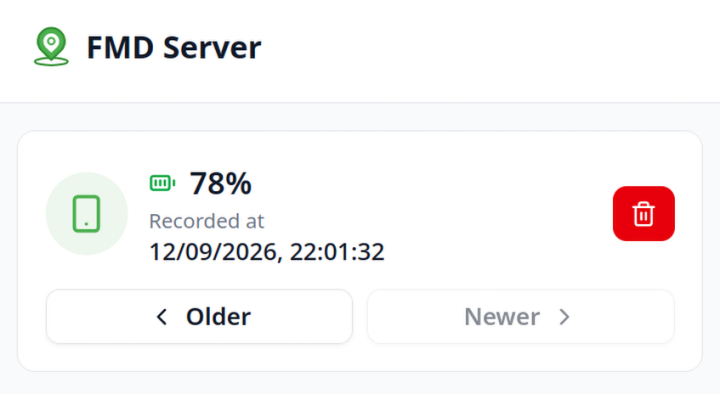
<p>Using the new API v2, we implemented a long-requested feature: per-item deletion.
Previously, you could not delete individual locations or pictures (only all of them).
Now you can delete any given location or picture, while keeping the rest.</p>
<p>This feature is only available for accounts using API v2.
See below for how to migrate your account from v1 to v2.</p>
<p><img decoding="async" loading="lazy" alt="Screenshot showing how to delete a single location" src="https://fmd-foss.org/assets/images/per-item-deletion-b4297513ed4a34d2a79a8b0b018df86d.png" width="720" height="394" class="img_XM6y"></p>
<h2 class="anchor anchorTargetStickyNavbar_iM01" id="what-changes-for-developers">What changes for developers<a href="https://fmd-foss.org/blog/2026/09/18/api-v2#what-changes-for-developers" class="hash-link" aria-label="Direct link to What changes for developers" title="Direct link to What changes for developers" translate="no">​</a></h2>
<p>If you are developing a <a class="" href="https://fmd-foss.org/docs/fmd-server/community">custom client or server</a> for the FMD Server ecosystem,
you need to implement API v2.
API v1 is deprecated and <strong>will be removed in FMD Android/Server 1.0!</strong></p>
<p>The following resources are available:</p>
<ul>
<li class="">The <a href="https://gitlab.com/fmd-foss/fmd-server/-/blob/master/backend/openapi-v2.yaml" target="_blank" rel="noopener noreferrer" class="">OpenAPI specification YAML</a>, describing the REST API</li>
<li class="">The <a href="https://gitlab.com/fmd-foss/server-protocol" target="_blank" rel="noopener noreferrer" class="">FMD Server Protocol specification</a>, describing the end-to-end encryption</li>
<li class="">The FMD Android and FMD Server <a href="https://gitlab.com/fmd-foss" target="_blank" rel="noopener noreferrer" class="">source code</a></li>
</ul>
<p>If you have questions, please ask in the Development room in the <a href="https://matrix.to/#/#fmd:matrix.org" target="_blank" rel="noopener noreferrer" class="">Matrix space</a>.</p>
<h2 class="anchor anchorTargetStickyNavbar_iM01" id="what-changes-for-server-operators">What changes for server operators<a href="https://fmd-foss.org/blog/2026/09/18/api-v2#what-changes-for-server-operators" class="hash-link" aria-label="Direct link to What changes for server operators" title="Direct link to What changes for server operators" translate="no">​</a></h2>
<p>Initially: nothing.
These changes are fully backwards compatible.
You can update your self-hosted server at your own pace, even if your users are already on FMD Android 0.17.0.</p>
<p>Since these changes are rather big, we recommend that you:</p>
<ol>
<li class=""><strong>Take a backup</strong> of your SQLite database file before upgrading.</li>
<li class="">Test the upgrade and all user-facing functionality in a staging environment before upgrading your production instance.</li>
</ol>
<div class="theme-admonition theme-admonition-tip admonition_HcNj alert alert--success"><div class="admonitionHeading_iVMi"><span class="admonitionIcon_NFEK"><svg viewBox="0 0 12 16"><path fill-rule="evenodd" d="M6.5 0C3.48 0 1 2.19 1 5c0 .92.55 2.25 1 3 1.34 2.25 1.78 2.78 2 4v1h5v-1c.22-1.22.66-1.75 2-4 .45-.75 1-2.08 1-3 0-2.81-2.48-5-5.5-5zm3.64 7.48c-.25.44-.47.8-.67 1.11-.86 1.41-1.25 2.06-1.45 3.23-.02.05-.02.11-.02.17H5c0-.06 0-.13-.02-.17-.2-1.17-.59-1.83-1.45-3.23-.2-.31-.42-.67-.67-1.11C2.44 6.78 2 5.65 2 5c0-2.2 2.02-4 4.5-4 1.22 0 2.36.42 3.22 1.19C10.55 2.94 11 3.94 11 5c0 .66-.44 1.78-.86 2.48zM4 14h5c-.23 1.14-1.3 2-2.5 2s-2.27-.86-2.5-2z"></path></svg></span>tip</div><div class="admonitionContent_GIrB"><p>For the hosted environment, we will do the usual staged rollout.
The "cutting edge" server (<a href="https://server-edge.fmd-foss.org/" target="_blank" rel="noopener noreferrer" class="">https://server-edge.fmd-foss.org</a>) will be upgraded immediately.
The stable server (<a href="https://server.fmd-foss.org/" target="_blank" rel="noopener noreferrer" class="">https://server.fmd-foss.org/</a>) will be updated a few weeks from now, if no critical issues are found.</p></div></div>
<h2 class="anchor anchorTargetStickyNavbar_iM01" id="what-changes-for-users">What changes for users<a href="https://fmd-foss.org/blog/2026/09/18/api-v2#what-changes-for-users" class="hash-link" aria-label="Direct link to What changes for users" title="Direct link to What changes for users" translate="no">​</a></h2>
<p>Initially: nothing.
These changes are fully backwards compatible.
It is safe to upgrade FMD Android to 0.17.0, even if your server has not yet upgraded.</p>
<p>You will only benefit from API v2, the modern cryptography, and per-item deletion if:</p>
<ol>
<li class="">Both your server and your Android app are upgraded to 0.17.0.</li>
<li class="">Your account is using the new cryptography. This is the case if:<!-- -->
<ol>
<li class="">You register a fresh account.</li>
<li class="">You step through the migration assistant in the FMD Android settings (in the "FMD Server" section).</li>
</ol>
</li>
</ol>
<p>Until you migrate your account, it will continue to use API v1.</p>
<h2 class="anchor anchorTargetStickyNavbar_iM01" id="how-to-migrate-your-account-to-api-v2">How to migrate your account to API v2<a href="https://fmd-foss.org/blog/2026/09/18/api-v2#how-to-migrate-your-account-to-api-v2" class="hash-link" aria-label="Direct link to How to migrate your account to API v2" title="Direct link to How to migrate your account to API v2" translate="no">​</a></h2>
<p>Use the FMD Android app to migrate your account to the FMD Server Protocol v2.</p>
<p>The cleanest migration path is to delete your account and re-register a fresh account with the same username.
This guarantees a clean state and that no old artifacts are accidentally left lying around.</p>
<p>However, deleting your account also deletes your locations and pictures.
So if you want to keep them around, please export them beforehand via the web interface.
Note that there is currently no way to import them again into FMD Server.</p>
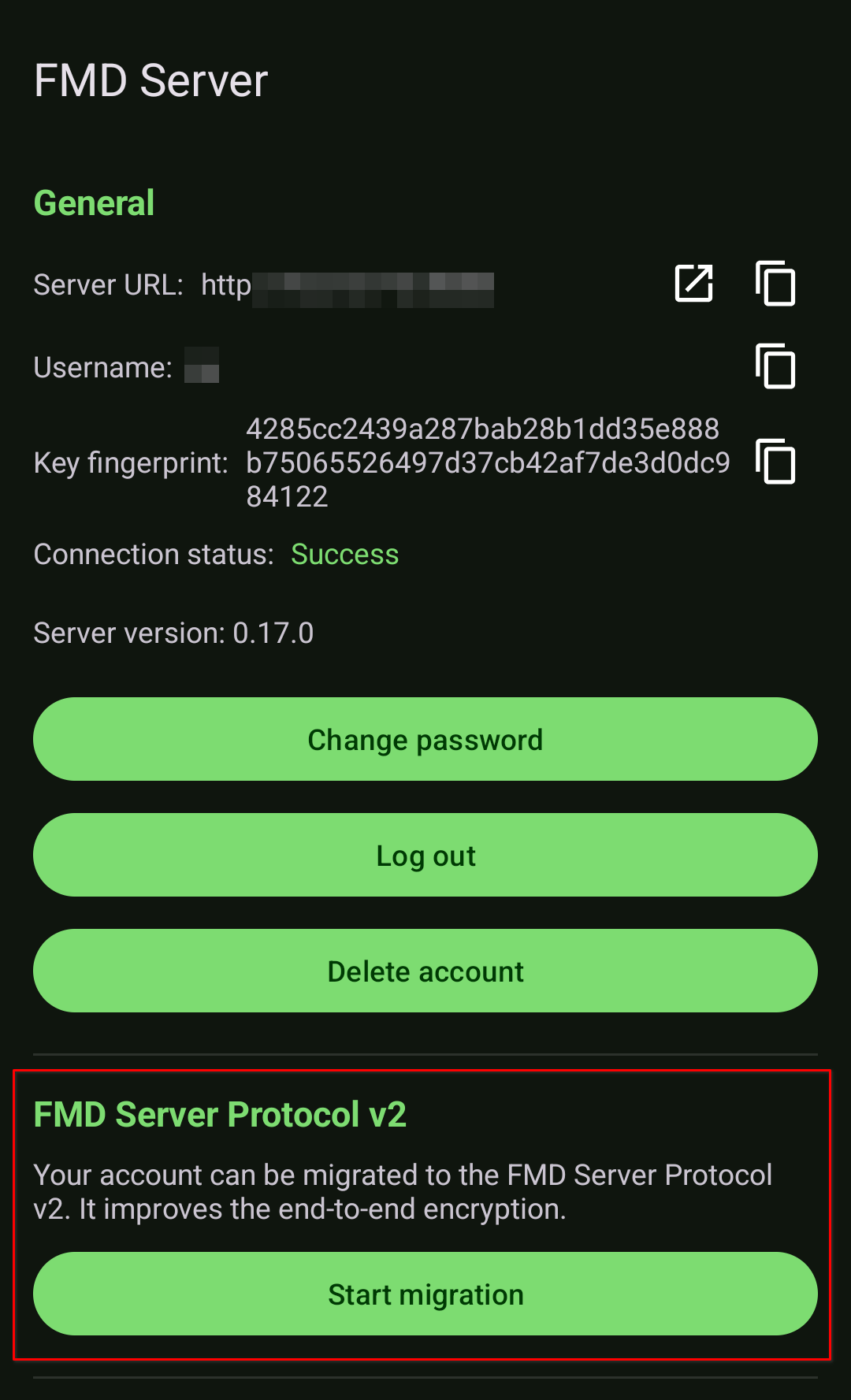
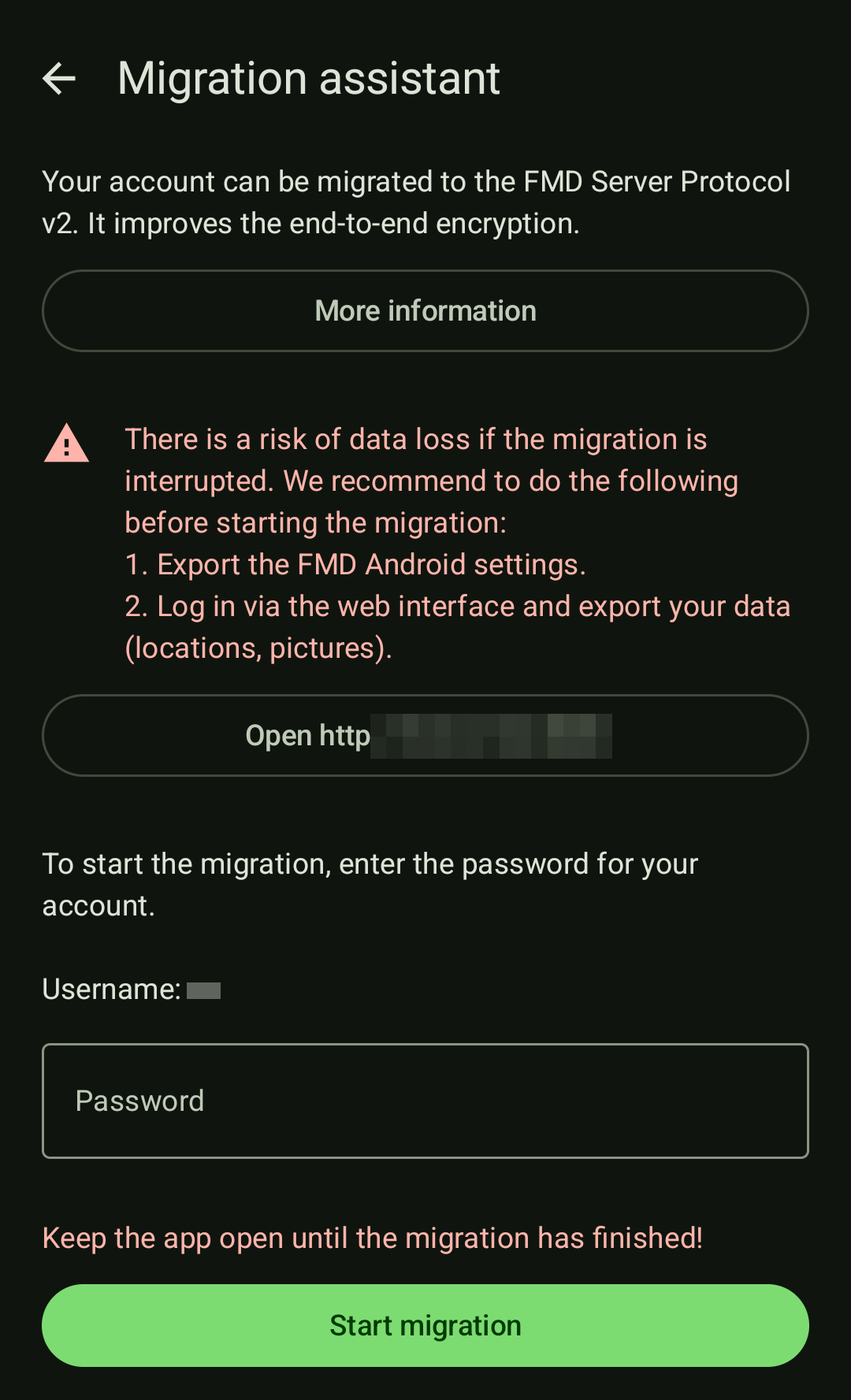
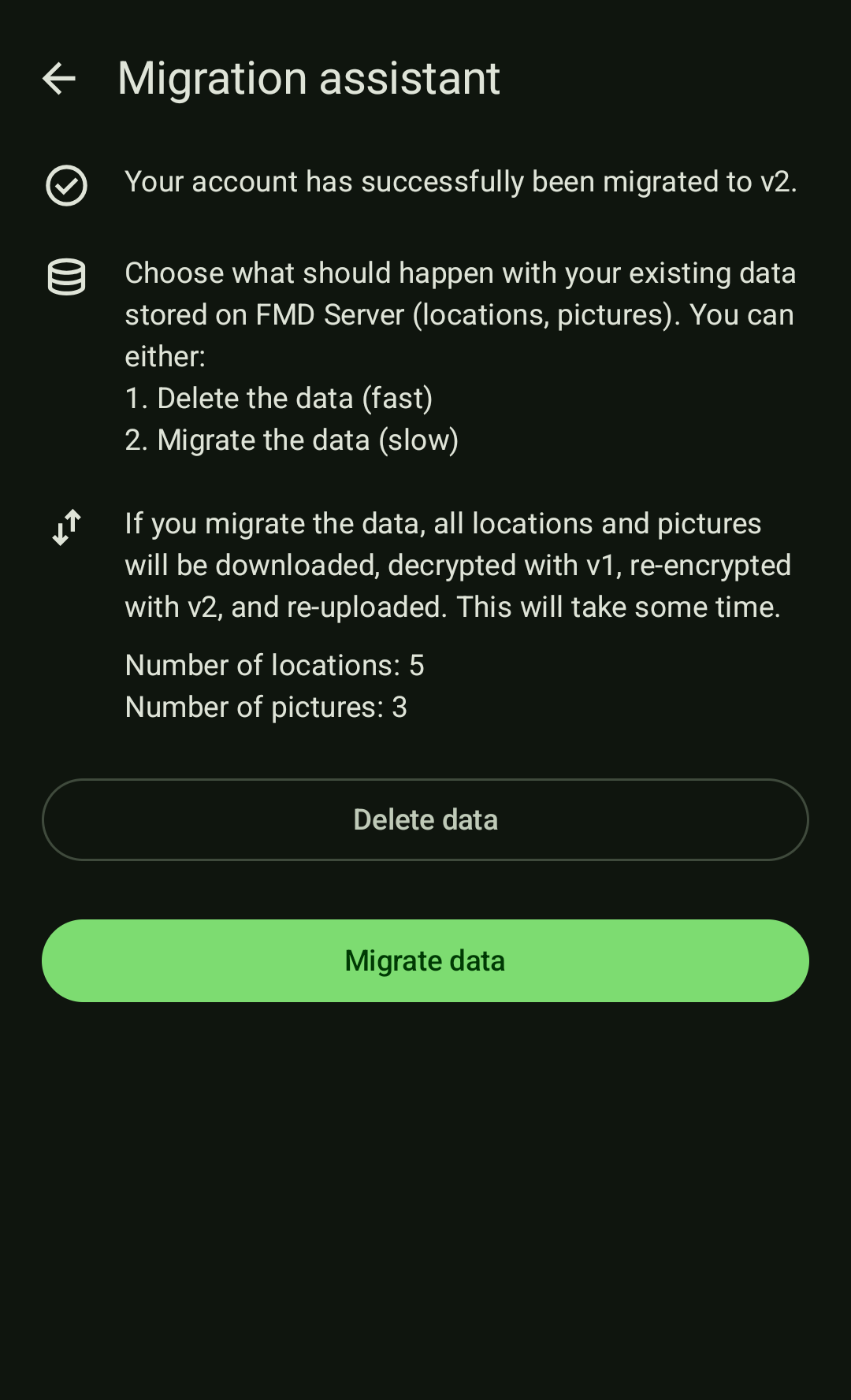
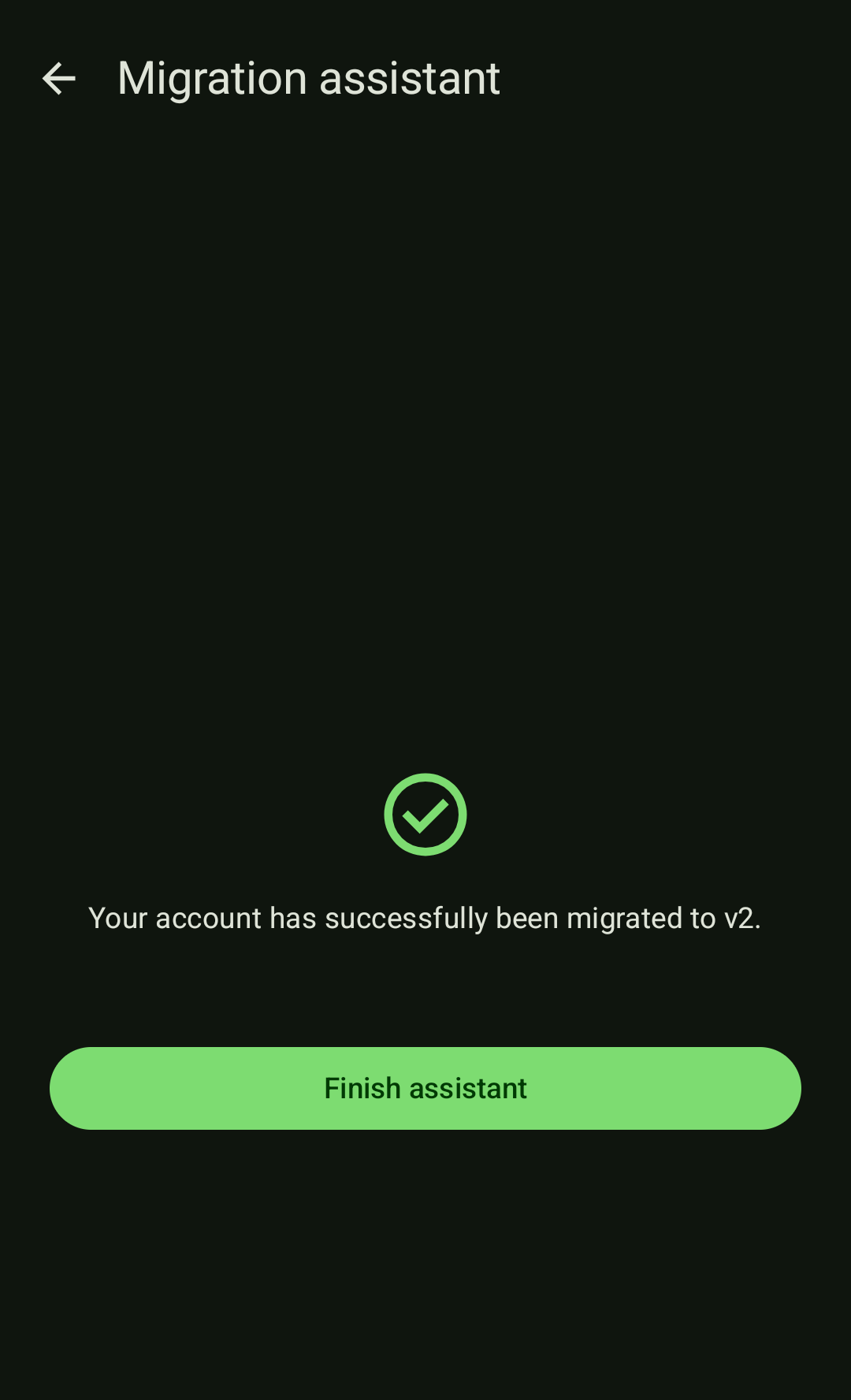
<p>Alternatively, if you want to keep your data on the server, use the in-app migration assistant to migrate your account.
It is located in the FMD Server section of the app settings.</p>
<table><thead><tr><th>FMD Server settings section</th><th>Migration start</th></tr></thead><tbody><tr><td><img decoding="async" loading="lazy" alt="Screenshot of the migration" src="https://fmd-foss.org/assets/images/proto-v2-migration-2-0e6cde0fe62cd9678c03c15da3b85fe6.png" width="1080" height="1777" class="img_XM6y"></td><td><img decoding="async" loading="lazy" alt="Screenshot of the migration" src="https://fmd-foss.org/assets/images/proto-v2-migration-3-1400ff5cb2a89ed03e2a48a7d8628b42.png" width="1080" height="1777" class="img_XM6y"></td></tr></tbody></table>
<table><thead><tr><th>Cryptographic keys migrated, data choice</th><th>Migration complete</th></tr></thead><tbody><tr><td><img decoding="async" loading="lazy" alt="Screenshot of the migration" src="https://fmd-foss.org/assets/images/proto-v2-migration-4-0ec2df22f0bcf43bb650dfda76647319.png" width="1080" height="1777" class="img_XM6y"></td><td><img decoding="async" loading="lazy" alt="Screenshot of the migration" src="https://fmd-foss.org/assets/images/proto-v2-migration-5-b1dbf31b37f127eb4ed66b87a7777dce.png" width="1080" height="1777" class="img_XM6y"></td></tr></tbody></table>
<div class="theme-admonition theme-admonition-info admonition_HcNj alert alert--info"><div class="admonitionHeading_iVMi"><span class="admonitionIcon_NFEK"><svg viewBox="0 0 14 16"><path fill-rule="evenodd" d="M7 2.3c3.14 0 5.7 2.56 5.7 5.7s-2.56 5.7-5.7 5.7A5.71 5.71 0 0 1 1.3 8c0-3.14 2.56-5.7 5.7-5.7zM7 1C3.14 1 0 4.14 0 8s3.14 7 7 7 7-3.14 7-7-3.14-7-7-7zm1 3H6v5h2V4zm0 6H6v2h2v-2z"></path></svg></span>info</div><div class="admonitionContent_GIrB"><p>Initially, users are not actively notified about the migration.
Once it proves stable with early adopters, we will release a new app version
that actively prompts users to perform the migration.</p><p>This is necessary because the future 1.0 release will remove support for the old
REST API v1 and FMD Server Protocol v1.
Therefore, all users need to migrate their accounts eventually.</p></div></div>
<h2 class="anchor anchorTargetStickyNavbar_iM01" id="acknowledgements">Acknowledgements<a href="https://fmd-foss.org/blog/2026/09/18/api-v2#acknowledgements" class="hash-link" aria-label="Direct link to Acknowledgements" title="Direct link to Acknowledgements" translate="no">​</a></h2>
<p>We thank NLnet for <a class="" href="https://fmd-foss.org/blog/2025/05/03/nlnet-funding#4-redesign-fmd-servers-rest-api">funding</a>
this work under the <a href="https://nlnet.nl/mobifree/" target="_blank" rel="noopener noreferrer" class="">NGI Mobifree</a> grant.</p>
<p>With the REST API and per-item deletion completed, we have finished the last remaining tasks from the grant! 🎉
We are very grateful for NLnet providing the support to make these improvements possible.
All of these items bring FMD closer to its 1.0 release.</p>]]></content>
        <author>
            <name>Thore</name>
            <uri>https://thore.io</uri>
        </author>
        <category label="android" term="android"/>
        <category label="server" term="server"/>
    </entry>
    <entry>
        <title type="html"><![CDATA[FMD Android 0.16.0]]></title>
        <id>https://fmd-foss.org/blog/2026/06/17/release-0.16.0-permissions</id>
        <link href="https://fmd-foss.org/blog/2026/06/17/release-0.16.0-permissions"/>
        <updated>2026-06-17T00:00:00.000Z</updated>
        <summary type="html"><![CDATA[FMD Android 0.16.0]]></summary>
        <content type="html"><![CDATA[<p><a href="https://gitlab.com/fmd-foss/fmd-android/-/releases/v0.16.0" target="_blank" rel="noopener noreferrer" class="">FMD Android 0.16.0</a>
introduces powerful permissions, allowing device owners to limit which commands
phone numbers and passwords can execute.</p>
<h2 class="anchor anchorTargetStickyNavbar_iM01" id="more-passwords">More passwords<a href="https://fmd-foss.org/blog/2026/06/17/release-0.16.0-permissions#more-passwords" class="hash-link" aria-label="Direct link to More passwords" title="Direct link to More passwords" translate="no">​</a></h2>
<p>Up until FMD Android 0.15.0, there was a single "FMD PIN".
This FMD PIN was used to grant access via phone numbers that were not explicitly allow-listed
as well as access by third-party apps through Notification Reply.
(Despite the name "PIN", alphabetical characters were allowed.)</p>
<p>FMD Android 0.16.0 splits this up into <strong>SMS passwords</strong> and <strong>notification passwords</strong>.
Instead of a single PIN/password for everything, device owners can define
multiple passwords that are separate for SMS and for Notification Reply.</p>
<h2 class="anchor anchorTargetStickyNavbar_iM01" id="fmd-permissions">FMD permissions<a href="https://fmd-foss.org/blog/2026/06/17/release-0.16.0-permissions#fmd-permissions" class="hash-link" aria-label="Direct link to FMD permissions" title="Direct link to FMD permissions" translate="no">​</a></h2>
<p>Previously, there was no real way to restrict which commands a
phone number, FMD PIN, or FMD Server were allowed to execute.
The workaround was to not grant the respective Android permission to the FMD Android app.</p>
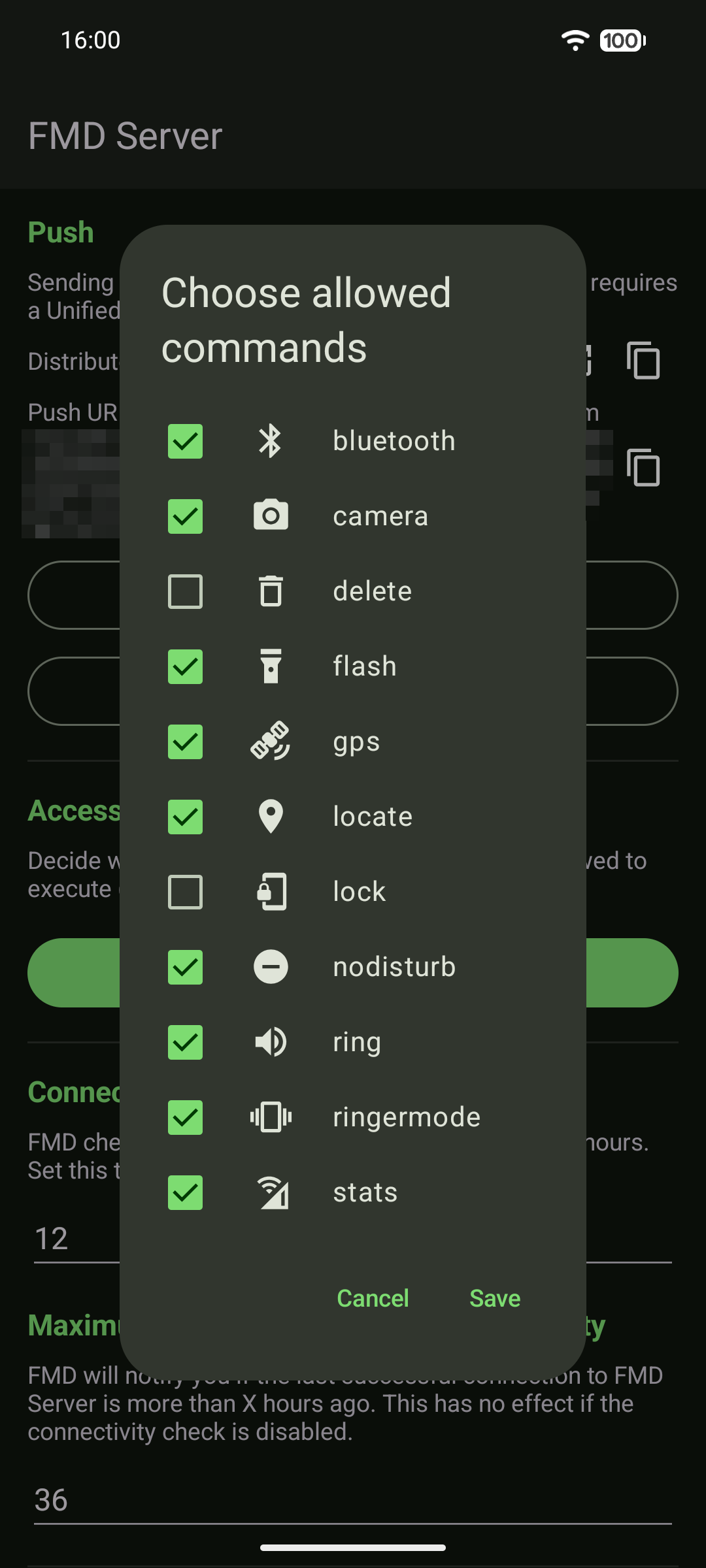
<p>FMD Android 0.16.0 introduces fine-grained <strong>FMD permissions</strong>.
For every phone number, password, and for FMD Server device owners can specify
which commands these transport channels are allowed to execute (and which not).</p>
<h2 class="anchor anchorTargetStickyNavbar_iM01" id="better-control">Better control<a href="https://fmd-foss.org/blog/2026/06/17/release-0.16.0-permissions#better-control" class="hash-link" aria-label="Direct link to Better control" title="Direct link to Better control" translate="no">​</a></h2>
<p>Together, these two changes give device owners more control and more flexibility
about how they want to open up their device to remote access.
For example, you could:</p>
<ul>
<li class="">Grant the <code>locate</code> permission to your friends' phone numbers,</li>
<li class="">Grant the <code>locate,ring,flash</code> permissions to your partner's phone number, and</li>
<li class="">Grant the <code>delete,lock</code> permissions to a secret SMS password that only you know.</li>
</ul>
<p>Please see the updated <a class="" href="https://fmd-foss.org/docs/fmd-android/security">security documentation</a> for more details.</p>
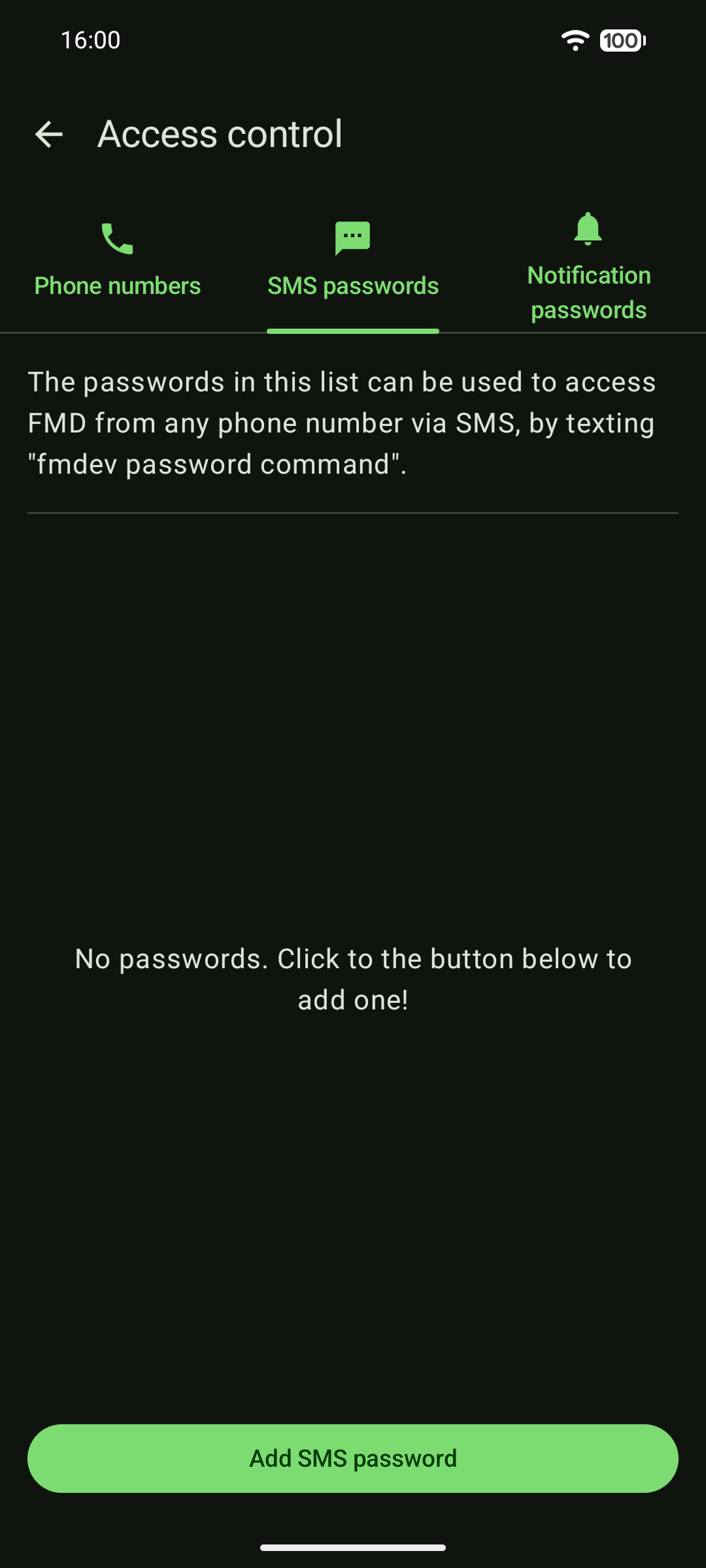
<p>This is how these new features look like:</p>
<table><thead><tr><th></th><th></th></tr></thead><tbody><tr><td><img decoding="async" loading="lazy" alt="Screenshot of the new access control screen" src="https://fmd-foss.org/assets/images/screenshot_access_password_overview-83795fd897feaf11416bfc6a418e4045.png" width="1080" height="2400" class="img_XM6y"></td><td><img decoding="async" loading="lazy" alt="Screenshot of the permission dialog" src="https://fmd-foss.org/assets/images/screenshot_access_server_permissions-966ad19852bfc17002a7becb61b79ca7.png" width="1080" height="2400" class="img_XM6y"></td></tr></tbody></table>
<div class="theme-admonition theme-admonition-tip admonition_HcNj alert alert--success"><div class="admonitionHeading_iVMi"><span class="admonitionIcon_NFEK"><svg viewBox="0 0 12 16"><path fill-rule="evenodd" d="M6.5 0C3.48 0 1 2.19 1 5c0 .92.55 2.25 1 3 1.34 2.25 1.78 2.78 2 4v1h5v-1c.22-1.22.66-1.75 2-4 .45-.75 1-2.08 1-3 0-2.81-2.48-5-5.5-5zm3.64 7.48c-.25.44-.47.8-.67 1.11-.86 1.41-1.25 2.06-1.45 3.23-.02.05-.02.11-.02.17H5c0-.06 0-.13-.02-.17-.2-1.17-.59-1.83-1.45-3.23-.2-.31-.42-.67-.67-1.11C2.44 6.78 2 5.65 2 5c0-2.2 2.02-4 4.5-4 1.22 0 2.36.42 3.22 1.19C10.55 2.94 11 3.94 11 5c0 .66-.44 1.78-.86 2.48zM4 14h5c-.23 1.14-1.3 2-2.5 2s-2.27-.86-2.5-2z"></path></svg></span>tip</div><div class="admonitionContent_GIrB"><p>These changes are rolling out gradually.
They are now available on the <a class="" href="https://fmd-foss.org/blog/2026/02/01/release-0.14.0#edge-channel">"edge" release channel</a>.
The main FMD Android app will receive this update in a bit later.</p></div></div>
<h2 class="anchor anchorTargetStickyNavbar_iM01" id="acknowledgements">Acknowledgements<a href="https://fmd-foss.org/blog/2026/06/17/release-0.16.0-permissions#acknowledgements" class="hash-link" aria-label="Direct link to Acknowledgements" title="Direct link to Acknowledgements" translate="no">​</a></h2>
<p>We thank NLnet for <a class="" href="https://fmd-foss.org/blog/2025/05/03/nlnet-funding#7-fine-grained-permission-control">funding</a>
this work under the <a href="https://nlnet.nl/mobifree/" target="_blank" rel="noopener noreferrer" class="">NGI Mobifree</a> grant.</p>]]></content>
        <author>
            <name>Thore</name>
            <uri>https://thore.io</uri>
        </author>
        <category label="android" term="android"/>
    </entry>
    <entry>
        <title type="html"><![CDATA[Signing FMD Releases]]></title>
        <id>https://fmd-foss.org/blog/2026/03/27/signing</id>
        <link href="https://fmd-foss.org/blog/2026/03/27/signing"/>
        <updated>2026-03-27T00:00:00.000Z</updated>
        <summary type="html"><![CDATA[FMD is now signing the APKs for FMD Android and the]]></summary>
        <content type="html"><![CDATA[<p>FMD is now signing the APKs for FMD Android and the
<a class="" href="https://fmd-foss.org/docs/fmd-server/installation/linux#step-1-get-the-binary">pre-built ZIPs</a> for FMD Server.
Additionally, there is now an <a href="https://packages.fmd-foss.org/fdroid/repo" target="_blank" rel="noopener noreferrer" class="">F-Droid-compatible repository</a>.
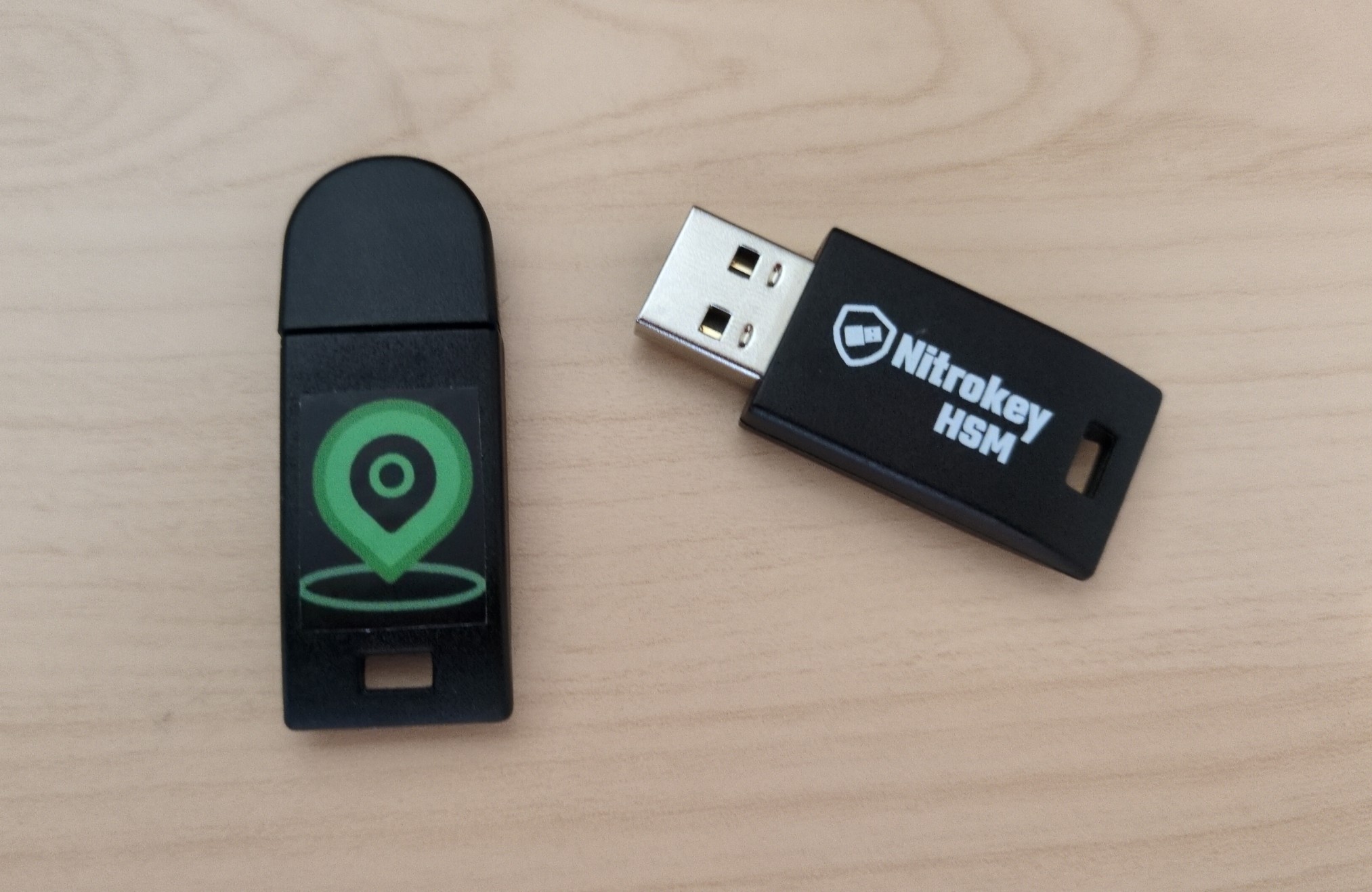
All of this is powered by signing keys stored securely in Nitrokey HSMs.</p>
<p><img decoding="async" loading="lazy" alt="Photo of two Nitrokey HSM USB sticks" src="https://fmd-foss.org/assets/images/nitrokey-hsm-c8e8d4b566ab0f11aa309b19427c3027.jpg" width="2026" height="1317" class="img_XM6y"></p>
<h2 class="anchor anchorTargetStickyNavbar_iM01" id="background">Background<a href="https://fmd-foss.org/blog/2026/03/27/signing#background" class="hash-link" aria-label="Direct link to Background" title="Direct link to Background" translate="no">​</a></h2>
<p>For a long time, <a href="https://gitlab.com/fmd-foss/fmd-android/-/work_items/228" target="_blank" rel="noopener noreferrer" class="">people have been asking</a>
us to sign the APKs for FMD Android ourselves.
The reason is simple and non-controversial: If FMD publishes compiled artifacts,
signatures will allow users to verify the <strong>authenticity</strong> and <strong>integrity</strong> of those artifacts.
Until now, downloads/installations of FMD were "only" protected by APK signatures created by F-Droid (FMD Android)
or by the TLS connection to our <a href="https://packages.fmd-foss.org/" target="_blank" rel="noopener noreferrer" class="">download server</a> (FMD Server).</p>
<p>So how difficult can it be? Generate a signing key, and off you go!</p>
<p>Unfortunately, managing keys is <em>hard</em>.
According to numbers from <a href="https://f-droid.org/2023/09/03/reproducible-builds-signing-keys-and-binary-repos.html" target="_blank" rel="noopener noreferrer" class="">IzzyOnDroid</a>,
roughly 5% of Android developers (1 in 20) lose their signing keys.
And in December 2025, <a href="https://github.com/lineageos4microg/l4m-wiki/wiki/December-2025-security-issues" target="_blank" rel="noopener noreferrer" class="">it was discovered</a>
that the "LineageOS for MicroG" Custom ROM had their file-based signing keys
exposed in a public git repository since January 2025.</p>
<p>So if we were going to sign artifacts at FMD, I wanted to do it right.
This includes building processes for securely generating and storing the signing keys,
backing them up, and sharing them between maintainers.
Additionally, I wanted to use a hardware token for this (instead of a file-based keystore).</p>
<h2 class="anchor anchorTargetStickyNavbar_iM01" id="results-for-users">Results for users<a href="https://fmd-foss.org/blog/2026/03/27/signing#results-for-users" class="hash-link" aria-label="Direct link to Results for users" title="Direct link to Results for users" translate="no">​</a></h2>
<p>Starting with version 0.14.1, people who use FMD Android or self-host FMD Server can:</p>
<ol>
<li class="">Manually install <a href="https://packages.fmd-foss.org/fdroid/repo/de.nulide.findmydevice_0.14.2.apk" target="_blank" rel="noopener noreferrer" class="">FMD Android APKs</a>
signed by the FMD maintainers.</li>
<li class="">Get app updates from our <a href="https://packages.fmd-foss.org/fdroid/repo" target="_blank" rel="noopener noreferrer" class="">F-Droid-compatible repository</a>.
This repository serves the aforementioned developer-signed APKs.</li>
<li class="">Verify the signature of the <a href="https://packages.fmd-foss.org/server" target="_blank" rel="noopener noreferrer" class="">pre-built FMD Server ZIPs</a>.</li>
</ol>
<p><a class="" href="https://fmd-foss.org/security/verify_signatures">This guide</a> explains how you can verify the various signatures.</p>
<h2 class="anchor anchorTargetStickyNavbar_iM01" id="results-for-developers">Results for developers<a href="https://fmd-foss.org/blog/2026/03/27/signing#results-for-developers" class="hash-link" aria-label="Direct link to Results for developers" title="Direct link to Results for developers" translate="no">​</a></h2>
<p>Making APK and F-Droid repository signing work with hardware tokens required a lot of effort.
The research started back in autumn 2025, stretched over multiple months,
and was done in parallel with normal development work.
In total, I estimate that I spent over 40 hours on this project (distributed across many evenings and weekends).
Additionally, Nulide and I (the FMD maintainers) travelled to physically meet up for the key generation ceremony.</p>
<p>FMD is not the first to tread this path.
For example, <a href="https://blog.dbrgn.ch/2024/6/30/fdroid-sign-with-hsm/" target="_blank" rel="noopener noreferrer" class="">Threema is using</a> a YubiHSM to sign their F-Droid repository.
Nevertheless, I needed to <a href="https://gitlab.com/fdroid/fdroidserver/-/merge_requests/1761" target="_blank" rel="noopener noreferrer" class="">patch <code>fdroidserver</code></a>
to be able to sign our F-Droid repository with a Nitrokey HSM.
In general, a lof of PKCS#11 tooling is intricate and often does not work out-of-the-box
(something that <a href="https://fosdem.org/2026/schedule/event/AV8MA9-open-source-hsm-based-aosp-signing/" target="_blank" rel="noopener noreferrer" class="">CalyxOS found as well</a>).</p>
<p>Therefore, FMD is publishing two main resources for other developers:</p>
<ol>
<li class=""><a class="" href="https://fmd-foss.org/security/signing/overview">A high-level guide</a> about our key management and signing processes,
the thinking behind it, and how to do it with a Nitrokey HSM.</li>
<li class=""><a href="https://gitlab.com/fmd-foss/key-management" target="_blank" rel="noopener noreferrer" class="">The scripts</a> that we use to generate keys and sign artifacts.</li>
</ol>
<p>We hope that this makes it easier for other developers to start using
hardware tokens (such as the Nitrokey HSM) to secure their signing keys.</p>
<h2 class="anchor anchorTargetStickyNavbar_iM01" id="key-attestation">Key Attestation<a href="https://fmd-foss.org/blog/2026/03/27/signing#key-attestation" class="hash-link" aria-label="Direct link to Key Attestation" title="Direct link to Key Attestation" translate="no">​</a></h2>
<p>That's all well and good, but how do you know that FMD is <em>really</em> using a Nitrokey HSM?
This is where <strong>attestation</strong> comes in.
Attestation allows you to verify that a signing key was generated inside a genuine Nitrokey HSM,
by following a certificate chain that leads up to the chip manufacturer's root CA.</p>
<p>This allows users to verify that FMD's signing keys are really generated and stored in a Nitrokey HSM.
You don't have to trust the FMD maintainers.
It's sufficient to trust the hardware vendor.</p>
<p>For this, we are providing:</p>
<ol>
<li class=""><a class="" href="https://fmd-foss.org/security/signing/attestation">A high-level guide</a> explaining how attestation works with a Nitrokey HSM.</li>
<li class=""><a class="" href="https://fmd-foss.org/security/verify_signatures#get-the-files-and-fingerprints">The attestation files</a> for the FMD signing keys.</li>
<li class=""><a href="https://gitlab.com/fmd-foss/key-management/-/blob/main/attestation_verify.js" target="_blank" rel="noopener noreferrer" class="">A script</a>
to verify the attestation certificate chain.</li>
</ol>
<p>This is a novelty.
While the Nitrokey HSM <a href="https://www.smartcard-hsm.com/2024/02/24/Key_Attestation_explained.html" target="_blank" rel="noopener noreferrer" class="">has supported attestation</a>
for a while, FMD is the first project to provide ready-made scripts and instructions
for verifying the <a href="https://en.wikipedia.org/wiki/Card_Verifiable_Certificate" target="_blank" rel="noopener noreferrer" class="">CVC</a> chains
<strong>and</strong> linking them to APK signatures via the SHA-256 public key fingerprint.
I am not aware of any other FOSS project that is using the Nitrokey HSM and its attestation feature
to provide a <strong>verifiable hardware root of trust</strong> for its APK signing keys.</p>
<h2 class="anchor anchorTargetStickyNavbar_iM01" id="what-changes-for-users">What changes for users<a href="https://fmd-foss.org/blog/2026/03/27/signing#what-changes-for-users" class="hash-link" aria-label="Direct link to What changes for users" title="Direct link to What changes for users" translate="no">​</a></h2>
<p>All of this work is primarily targeted at other developers and at users with very high security requirements.</p>
<p>If you are a normal user, you can continue to receive app updates from F-Droid just as before.
There is no visible change for you.</p>
<p>Right now, the APKs on <a href="https://f-droid.org/" target="_blank" rel="noopener noreferrer" class="">https://f-droid.org</a> will continue to be signed by F-Droid.
We may eventually migrate f-droid.org to publish developer-signed APKs,
but we don't have a timeline for that yet.
Even when that happens, we recommend to continue getting updates from f-droid.org,
because then you will have F-Droid as an independent party verifying that our APKs <a class="" href="https://fmd-foss.org/security/reproducibility">are reproducible</a>.</p>
<p>If you want to change to the developer-signed APKs, you need to reinstall FMD Android
from <a href="https://packages.fmd-foss.org/fdroid/repo" target="_blank" rel="noopener noreferrer" class="">https://packages.fmd-foss.org/fdroid/repo</a>.
Note that you can export your settings from within FMD Android and re-import them.</p>
<h2 class="anchor anchorTargetStickyNavbar_iM01" id="acknowledgements">Acknowledgements<a href="https://fmd-foss.org/blog/2026/03/27/signing#acknowledgements" class="hash-link" aria-label="Direct link to Acknowledgements" title="Direct link to Acknowledgements" translate="no">​</a></h2>
<p>This work has been <a class="" href="https://fmd-foss.org/blog/2025/05/03/nlnet-funding#1-publish-dev-signed-apks">funded by NLnet</a>
under the <a href="https://nlnet.nl/mobifree/" target="_blank" rel="noopener noreferrer" class="">NGI Mobifree</a> grant.</p>]]></content>
        <author>
            <name>Thore</name>
            <uri>https://thore.io</uri>
        </author>
    </entry>
    <entry>
        <title type="html"><![CDATA[FMD Server on Snapcraft]]></title>
        <id>https://fmd-foss.org/blog/2026/03/20/snap-release</id>
        <link href="https://fmd-foss.org/blog/2026/03/20/snap-release"/>
        <updated>2026-03-20T00:00:00.000Z</updated>
        <summary type="html"><![CDATA[We have released FMD Server as a snap on the Snap Store.]]></summary>
        <content type="html"><![CDATA[<p>We have released FMD Server as a <a href="https://snapcraft.io/fmd-server" target="_blank" rel="noopener noreferrer" class="">snap on the Snap Store</a>.</p>
<h2 class="anchor anchorTargetStickyNavbar_iM01" id="snap">Snap<a href="https://fmd-foss.org/blog/2026/03/20/snap-release#snap" class="hash-link" aria-label="Direct link to Snap" title="Direct link to Snap" translate="no">​</a></h2>
<p>We've expanded our packaging options and are now offering FMD Server as a snap.</p>
<p><a href="https://snapcraft.io/fmd-server" target="_blank" rel="noopener noreferrer" class=""><img decoding="async" loading="lazy" src="https://snapcraft.io/en/dark/install.svg" alt="Get it from the Snap Store" class="img_XM6y"></a></p>
<p>Snap is a self-contained, sandboxed packaging system from Canonical.
It comes pre-installed on Ubuntu and derivatives, and
<a href="https://snapcraft.io/docs/tutorials/install-the-daemon/" target="_blank" rel="noopener noreferrer" class="">can be installed</a> on many other distributions, too.</p>
<h2 class="anchor anchorTargetStickyNavbar_iM01" id="what-are-the-benefits">What are the benefits?<a href="https://fmd-foss.org/blog/2026/03/20/snap-release#what-are-the-benefits" class="hash-link" aria-label="Direct link to What are the benefits?" title="Direct link to What are the benefits?" translate="no">​</a></h2>
<ul>
<li class="">Sandboxed Security<!-- -->
<ul>
<li class="">Each snap runs with the minimum permission in an isolated environment</li>
</ul>
</li>
<li class="">Self-Contained:<!-- -->
<ul>
<li class="">All needed dependencies are included, eliminating conflicts.</li>
</ul>
</li>
<li class="">Easy installation</li>
<li class="">Automatic updates</li>
</ul>
<p>An installation and configuration guide can be found in our <a class="" href="https://fmd-foss.org/docs/fmd-server/installation/snap">docs</a>.</p>
<p>We hope this step makes it easier for the admins and hobbyists out there to manage and run their own FMD Server instance.</p>
<p>Don't worry, this is only an extension of our packaging options. So if you don't want to use it, you don't have to.</p>
<p>We would like to thank <a class="" href="https://fmd-foss.org/blog/2025/05/03/nlnet-funding#3-package-fmd-server-for-more-platforms">NLnet</a> for funding this.</p>]]></content>
        <author>
            <name>Nulide</name>
            <uri>https://nulide.de</uri>
        </author>
        <category label="server" term="server"/>
    </entry>
    <entry>
        <title type="html"><![CDATA[FMD Android 0.14.0 and FMD Server 0.14.0]]></title>
        <id>https://fmd-foss.org/blog/2026/02/01/release-0.14.0</id>
        <link href="https://fmd-foss.org/blog/2026/02/01/release-0.14.0"/>
        <updated>2026-02-01T00:00:00.000Z</updated>
        <summary type="html"><![CDATA[The new FMD Android 0.14.0]]></summary>
        <content type="html"><![CDATA[<p>The new <a href="https://gitlab.com/fmd-foss/fmd-android/-/releases/v0.14.0" target="_blank" rel="noopener noreferrer" class="">FMD Android 0.14.0</a>
and <a href="https://gitlab.com/fmd-foss/fmd-server/-/releases/v0.14.0" target="_blank" rel="noopener noreferrer" class="">FMD Server 0.14.0</a> releases are available!
Command execution and locating are much more reliable now,
and FMD Server has a completely rewritten, modern React web frontend.</p>
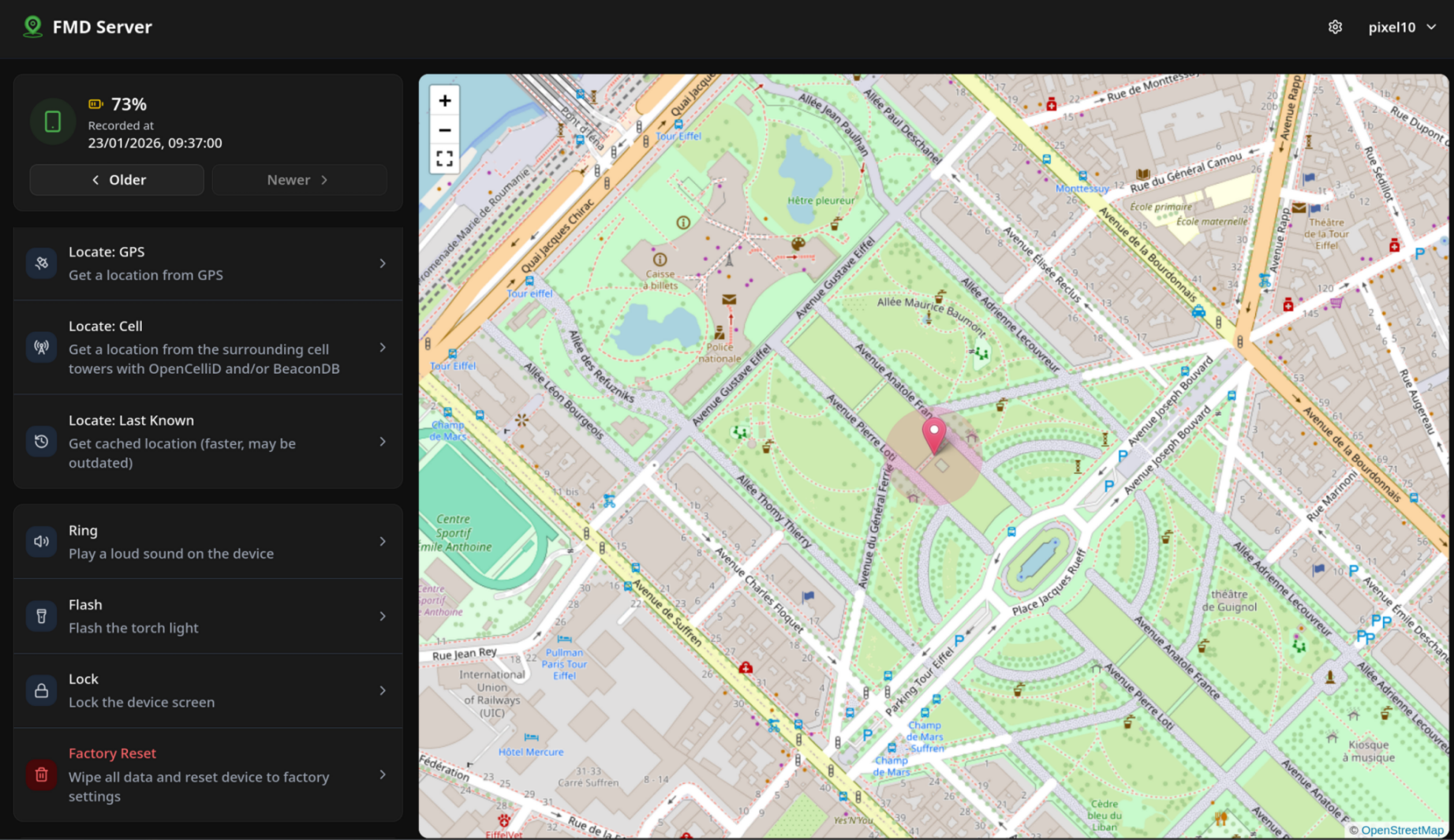
<h2 class="anchor anchorTargetStickyNavbar_iM01" id="new-web-frontend">New web frontend<a href="https://fmd-foss.org/blog/2026/02/01/release-0.14.0#new-web-frontend" class="hash-link" aria-label="Direct link to New web frontend" title="Direct link to New web frontend" translate="no">​</a></h2>
<p><a href="https://gitlab.com/lone-cloud" target="_blank" rel="noopener noreferrer" class="">@lone-cloud</a> has kindly rewritten the FMD Server web UI
in React, using Vite and TailwindCSS.</p>
<p>For users, this results in a much nicer looking interface with consistent, modern UI components.
Notable improvements include:</p>
<ul>
<li class="">Light mode. And a setting to switch between theme modes.</li>
<li class="">Ability to view the map in fullscreen.</li>
<li class="">Ability to pass a message when locking the device (<code>fmd lock &lt;message&gt;</code>).</li>
<li class="">Setting to switch between metric and imperial units.</li>
<li class="">The command list is much longer, making nearly all commands available in the web UI.
The commands now also have a description.</li>
<li class="">The UI now automatically refreshes the location shown on the map.
(Currently by polling after a <code>locate</code> command was sent. In the future maybe with WebSocket push.)</li>
<li class="">If you select "Remember me" during login, the access token and the private keys
will now be stored in the browser's local storage.
This means you don't need to log in again when you reload the page.</li>
</ul>
<p>For developers, the modern stack will allow us to more easily add new features.
The old stack of static HTML and hand-rolled CSS was very cumbersome to work with.</p>
<p><img decoding="async" loading="lazy" alt="Screenshot of the FMD Server web interface" src="https://fmd-foss.org/assets/images/screenshot-server-0f76e84f4c6f735c749ed1cf4f751db3.png" width="1843" height="1065" class="img_XM6y"></p>
<h2 class="anchor anchorTargetStickyNavbar_iM01" id="executing-commands-as-foreground-services">Executing commands as foreground services<a href="https://fmd-foss.org/blog/2026/02/01/release-0.14.0#executing-commands-as-foreground-services" class="hash-link" aria-label="Direct link to Executing commands as foreground services" title="Direct link to Executing commands as foreground services" translate="no">​</a></h2>
<p>Historically, FMD Android has used background services to execute the commands that it received.
Unfortunately, this no longer works as reliable as we would like.
We have reports of the background jobs being stopped mid-run,
and Android is increasingly more restrictive about apps accessing the location from the background.</p>
<p>Therefore, we have rewritten the command execution to use a <strong>foreground service</strong>.
The only user-facing difference is that (due to Android requirements) FMD now has to show a notification while the work is executing.
If you want, you can hide the notification by disabling its notification channel.</p>
<p>Right now, these foreground services are launched on-demand, and exit after the command has finished.
We hope that this is sufficient to make FMD work more reliably.
An additional "escalation" (that we like to avoid, and have not yet implemented),
would be to keep a continuous foreground service running forever.</p>
<h2 class="anchor anchorTargetStickyNavbar_iM01" id="improved-locating">Improved locating<a href="https://fmd-foss.org/blog/2026/02/01/release-0.14.0#improved-locating" class="hash-link" aria-label="Direct link to Improved locating" title="Direct link to Improved locating" translate="no">​</a></h2>
<p>Historically, FMD had the <code>fmd locate gps</code> command.
The name <code>gps</code> was misleading, as under the hood this simply asked Android for the current location.
Android would then decide how it resolved that location.</p>
<p>FMD Android 0.14.0 splits this into two options: <code>locate fused</code> and <code>locate gps</code>.</p>
<ul>
<li class=""><code>fused</code> has the same behavior as previously <code>gps</code>:
Android will choose the location provider or a combination thereof (hence the name "fused").
In practice, this is often a network location, since that is faster and more power-efficient than GPS.
For example, GrapheneOS has a very reliable <a class="" href="https://fmd-foss.org/docs/fmd-android/locating#network-location-on-grapheneos">network location provider</a>.</li>
<li class=""><code>gps</code> now does what it says: Get a location from GPS/GNSS, and only that.</li>
</ul>
<p><code>locate gps</code> has gotten more clever as well: Instead of simply taking the first location that it gets,
FMD waits a bit, until the accuracy of the measurements converges and does not improve anymore.
This is important, because the first GPS location is usually very rough,
and subsequent GPS locations (within the first 10 to 20 seconds) have a heavily improved accuracy.</p>
<h2 class="anchor anchorTargetStickyNavbar_iM01" id="new-command-flash">New command: flash<a href="https://fmd-foss.org/blog/2026/02/01/release-0.14.0#new-command-flash" class="hash-link" aria-label="Direct link to New command: flash" title="Direct link to New command: flash" translate="no">​</a></h2>
<p>FMD now has a new command: <code>fmd flash</code>.
Just like <code>ring</code> will make an audible noise for a few seconds,
<code>flash</code> will cause your camera light/torch to flash for a few seconds.
This is a great visual indicator, for example, for finding your phone at night when others are already sleeping.</p>
<p>Additionally, the <code>camera</code> command has a new option: <code>fmd camera back flash</code>.
As the name suggests, this will take a photo with a camera flash.
And it works with <code>camera front flash</code>, too!</p>
<p>Note: The <code>camera flash</code> option is <strong>not yet available</strong> on the FMD Server web UI (but the <code>flash</code> command is).
But you can send the <code>camera flash</code> command via any of the other transport channels.</p>
<h2 class="anchor anchorTargetStickyNavbar_iM01" id="separate-delete-password">Separate delete password<a href="https://fmd-foss.org/blog/2026/02/01/release-0.14.0#separate-delete-password" class="hash-link" aria-label="Direct link to Separate delete password" title="Direct link to Separate delete password" translate="no">​</a></h2>
<p>Previously, there was a single "FMD PIN" that:</p>
<ul>
<li class="">Grants anonymous access to FMD.
For example through SMS from a non-allowlisted phone number or through the notification reply transport channel.</li>
<li class="">Authenticates <code>delete</code> commands.</li>
</ul>
<p>Starting in FMD Android 0.14.0, there is a "delete password" which is separate from the FMD PIN.
This provides better separation between the two purposes, and better protects the <code>delete</code> command from abuse.
For users who upgrade from an earlier version, this password is initialized to the FMD PIN, if it exists.</p>
<h2 class="anchor anchorTargetStickyNavbar_iM01" id="edge-channel">Edge channel<a href="https://fmd-foss.org/blog/2026/02/01/release-0.14.0#edge-channel" class="hash-link" aria-label="Direct link to Edge channel" title="Direct link to Edge channel" translate="no">​</a></h2>
<p>The official FMD deployments are now split into two channels: "production" and "edge".
This applies to both the Android app and the server:</p>
<ul>
<li class="">FMD Android:<!-- -->
<ul>
<li class=""><a href="https://f-droid.org/packages/de.nulide.findmydevice/" target="_blank" rel="noopener noreferrer" class="">https://f-droid.org/packages/de.nulide.findmydevice/</a></li>
<li class=""><a href="https://f-droid.org/packages/de.nulide.findmydevice.edge/" target="_blank" rel="noopener noreferrer" class="">https://f-droid.org/packages/de.nulide.findmydevice.edge/</a></li>
</ul>
</li>
<li class="">FMD Server:<!-- -->
<ul>
<li class=""><a href="https://server.fmd-foss.org/" target="_blank" rel="noopener noreferrer" class="">https://server.fmd-foss.org/</a></li>
<li class=""><a href="https://server-edge.fmd-foss.org/" target="_blank" rel="noopener noreferrer" class="">https://server-edge.fmd-foss.org/</a></li>
</ul>
</li>
</ul>
<p>Going forward, new releases will first be deployed on the "edge" channel.
If after some time (one or two weeks), no major issues are reported,
the release will be promoted to the production channel.
If an issue is found, a patch release will be made and published to the "edge" channel.
Then it repeats: if that patch release is stable after a week or two, the release will be promoted to production.</p>
<p>Note that new releases will immediately be available for download on the production channel, too.
This allows you to update your production setup earlier, if you want.
However, F-Droid won't suggest the update unless you opt-in to "beta updates".
And the official FMD Server deployment (<code>server.fmd-foss.org</code>) also won't be updated immediately.
If you self-host FMD Server, it is up to you to run your own staging/integration environment where you can test-drive releases.</p>
<p>Think about this as similar to Ubuntu LTS versions:
If you are on Ubuntu 24.04 LTS, Canonical will release 26.04 LTS in April 2026.
This version is generally good and ready to used.
However, because LTS users require extreme stability, the upgrade will not be suggested
to LTS users until after 26.04.1 has been released (usually around August).</p>
<div class="theme-admonition theme-admonition-tip admonition_HcNj alert alert--success"><div class="admonitionHeading_iVMi"><span class="admonitionIcon_NFEK"><svg viewBox="0 0 12 16"><path fill-rule="evenodd" d="M6.5 0C3.48 0 1 2.19 1 5c0 .92.55 2.25 1 3 1.34 2.25 1.78 2.78 2 4v1h5v-1c.22-1.22.66-1.75 2-4 .45-.75 1-2.08 1-3 0-2.81-2.48-5-5.5-5zm3.64 7.48c-.25.44-.47.8-.67 1.11-.86 1.41-1.25 2.06-1.45 3.23-.02.05-.02.11-.02.17H5c0-.06 0-.13-.02-.17-.2-1.17-.59-1.83-1.45-3.23-.2-.31-.42-.67-.67-1.11C2.44 6.78 2 5.65 2 5c0-2.2 2.02-4 4.5-4 1.22 0 2.36.42 3.22 1.19C10.55 2.94 11 3.94 11 5c0 .66-.44 1.78-.86 2.48zM4 14h5c-.23 1.14-1.3 2-2.5 2s-2.27-.86-2.5-2z"></path></svg></span>tip</div><div class="admonitionContent_GIrB"><p><strong>You can install FMD Android and FMD Android edge in parallel</strong> on the same device.
This allows you to test the edge channel, and later update the production app.
To send commands to FMD Android edge, use <code>fmde locate</code> (note the "e" at the end
of the <a class="" href="https://fmd-foss.org/docs/fmd-android/overview#changing-the-command-keyword">command keyword</a>).</p></div></div>
<h2 class="anchor anchorTargetStickyNavbar_iM01" id="future-work">Future work<a href="https://fmd-foss.org/blog/2026/02/01/release-0.14.0#future-work" class="hash-link" aria-label="Direct link to Future work" title="Direct link to Future work" translate="no">​</a></h2>
<p>The command execution reliability improvements have been
<a class="" href="https://fmd-foss.org/blog/2025/05/03/nlnet-funding#6-make-background-execution-on-android-more-reliable">funded by NLnet</a>.
We are already working on other items from that grant, especially the packaging and signing work (tasks 1-3).
So stay tuned for more improvements in the coming months!</p>]]></content>
        <author>
            <name>Thore</name>
            <uri>https://thore.io</uri>
        </author>
        <category label="android" term="android"/>
        <category label="server" term="server"/>
    </entry>
    <entry>
        <title type="html"><![CDATA[New Server Infrastructure]]></title>
        <id>https://fmd-foss.org/blog/2025/11/08/new-server</id>
        <link href="https://fmd-foss.org/blog/2025/11/08/new-server"/>
        <updated>2025-11-08T00:00:00.000Z</updated>
        <summary type="html"><![CDATA[We have spun up a new virtual server (VPS) dedicated for FMD project use.]]></summary>
        <content type="html"><![CDATA[<p>We have spun up a new virtual server (VPS) dedicated for FMD project use.
The publicly hosted server <code>fmd.nulide.de</code> has been migrated to this new VPS.</p>
<p>This is another step in the direction of "institutionalising" FMD as a project,
providing better service, and reducing <a href="https://en.wikipedia.org/wiki/Bus_factor" target="_blank" rel="noopener noreferrer" class="">bus factor</a>.</p>
<p>This post explains the new server setup that we built for FMD.</p>
<h2 class="anchor anchorTargetStickyNavbar_iM01" id="looking-back">Looking back<a href="https://fmd-foss.org/blog/2025/11/08/new-server#looking-back" class="hash-link" aria-label="Direct link to Looking back" title="Direct link to Looking back" translate="no">​</a></h2>
<p>Nulide started FMD (originally called <em>FindMyDevice</em>)
<a href="https://gitlab.com/fmd-foss/fmd-android/-/commit/f96c45cc345d0ab656ed38dbeb0652aff7233e52" target="_blank" rel="noopener noreferrer" class="">back in 2020</a>.
Initially, the only transport mode was SMS.
In 2021, Nulide <a href="https://gitlab.com/fmd-foss/fmd-server/-/commit/08193e4ef43feb71c6888953cf9b5ecc844a610d" target="_blank" rel="noopener noreferrer" class="">started to work</a>
on FMD Server as an additional transport mode.</p>
<p>Nulide hosted his personal FMD Server instance at <a href="https://fmd.nulide.de/" target="_blank" rel="noopener noreferrer" class="">https://fmd.nulide.de</a>,
and opened it up to the world.
It became the default, public instance that people can use.
In the FMD Android app, users get the choice between using this default instance or hosting their own.</p>
<p>However, this setup has two disadvantages:</p>
<ol>
<li class="">It runs on the same <a href="https://en.wikipedia.org/wiki/Virtual_private_server" target="_blank" rel="noopener noreferrer" class="">Virtual Private Server (VPS)</a>
as Nulide's other self-hosted services.</li>
<li class="">Nulide is the only one with SSH access to this VPS.</li>
</ol>
<p>As FMD grew and became more popular, and as I joined as a maintainer, it became clear
that it would be beneficial to move the "official" public FMD Server instance
to a dedicated server and a dedicated domain name.</p>
<p>A separate server has the advantage that:</p>
<ol>
<li class="">Keeps Nulide's private services separate from the public FMD Server instance.
The public instance has thousands of active users.</li>
<li class="">Gives other FMD maintainers SSH access (currently Nulide and me).
If something breaks (a TLS certificate expires...), there is a higher chance
that one of the maintainers is available and can respond.</li>
</ol>
<h2 class="anchor anchorTargetStickyNavbar_iM01" id="getting-a-dedicated-vps">Getting a dedicated VPS<a href="https://fmd-foss.org/blog/2025/11/08/new-server#getting-a-dedicated-vps" class="hash-link" aria-label="Direct link to Getting a dedicated VPS" title="Direct link to Getting a dedicated VPS" translate="no">​</a></h2>
<p>Therefore, we now rent a VPS.
It's a <a href="https://www.netcup.com/de/server/vps/vps-1000-g11-12m" target="_blank" rel="noopener noreferrer" class="">VPS G1000 G11</a>,
is hosted by Netcup in Nürnberg, Germany 🇩🇪, and costs roughly 7 € per month.
It has 4 cores, 8 GB RAM, and 256 GB SSD.
Right now, this is <em>a tiny bit</em> overpowered.
But I prefer to have some room to grow, and not need to migrate everything to a new VPS in one year.
Additionally, this allows us to run multiple services on it (see below).</p>
<p>The server is provisioned using <a href="https://de.wikipedia.org/wiki/Ansible" target="_blank" rel="noopener noreferrer" class="">Ansible</a>.
Of course, the deployment scripts (playbooks) are <a href="https://gitlab.com/fmd-foss/infra/" target="_blank" rel="noopener noreferrer" class="">open source</a>.</p>
<h2 class="anchor anchorTargetStickyNavbar_iM01" id="getting-a-domain">Getting a domain<a href="https://fmd-foss.org/blog/2025/11/08/new-server#getting-a-domain" class="hash-link" aria-label="Direct link to Getting a domain" title="Direct link to Getting a domain" translate="no">​</a></h2>
<p>Apart from renting a VPS, we also needed a domain for the FMD project.
<a href="https://gitlab.com/fmd-foss/fmd-android/-/issues/283" target="_blank" rel="noopener noreferrer" class="">After some brainstorming and discussion</a>,
we settled on <code>fmd-foss.org</code>.
This was back in April 2025.</p>
<p>Having a domain not only allows us to have this website with a blog and documentation,
it also allows us to host other services under subdomains,
thus making it clear that they belong to the FMD project.</p>
<p>We also registered some adjacent domains, like <code>fmdfoss.org</code> and <code>fmd-foss.com</code>.
We don't use these domains, but we want to prevent others from registering and abusing them.
In total, we currently pay roughly 5 € per month for domains.
With more budget, we may expand to register more domains that are "too similar" to our production domain.</p>
<h2 class="anchor anchorTargetStickyNavbar_iM01" id="new-services">New services<a href="https://fmd-foss.org/blog/2025/11/08/new-server#new-services" class="hash-link" aria-label="Direct link to New services" title="Direct link to New services" translate="no">​</a></h2>
<p>Equipped with a domain and a server, we were ready to go and start hosting.</p>
<h3 class="anchor anchorTargetStickyNavbar_iM01" id="fmdnulidede--serverfmd-fossorg">fmd.nulide.de ➞ server.fmd-foss.org<a href="https://fmd-foss.org/blog/2025/11/08/new-server#fmdnulidede--serverfmd-fossorg" class="hash-link" aria-label="Direct link to fmd.nulide.de ➞ server.fmd-foss.org" title="Direct link to fmd.nulide.de ➞ server.fmd-foss.org" translate="no">​</a></h3>
<p>First of all, we have migrated the publicly hosted server <code>fmd.nulide.de</code> from Nulide's private VPS to our new VPS.</p>
<p>This involved some downtime, as we had to shut down FMD Server on the old VPS,
copy the database to the new VPS, and start FMD Server on the new VPS.</p>
<p>As a result, <strong>the hosted public server is now reachable under <a href="https://server.fmd-foss.org/" target="_blank" rel="noopener noreferrer" class="">https://server.fmd-foss.org</a></strong>.
This is the recommended domain going forward.
<a href="https://fmd.nulide.de/" target="_blank" rel="noopener noreferrer" class="">https://fmd.nulide.de</a> still exists continues to work for the time being.
We will update all references to <code>fmd.nulide.de</code> and point them to <code>server.fmd-foss.org</code>.
A future app update for FMD Android will automatically and permanently
update the domain for existing users in their app settings.
(Edit, 2025-11-23: This is included in <a href="https://gitlab.com/fmd-foss/fmd-android/-/releases/v0.13.0" target="_blank" rel="noopener noreferrer" class="">0.13.0</a>.)</p>
<p>At some point, Nulide may reuse the <code>fmd.nulide.de</code> domain for a private FMD Server
that is locked down with a registration token.
If and when this happens we will announce it.
Our current plan is to keep <a href="https://fmd.nulide.de/" target="_blank" rel="noopener noreferrer" class="">https://fmd.nulide.de</a> <strong>at least until 2026-05-01 (~6 months)</strong>, maybe longer.</p>
<h3 class="anchor anchorTargetStickyNavbar_iM01" id="server-betafmd-fossorg">server-beta.fmd-foss.org<a href="https://fmd-foss.org/blog/2025/11/08/new-server#server-betafmd-fossorg" class="hash-link" aria-label="Direct link to server-beta.fmd-foss.org" title="Direct link to server-beta.fmd-foss.org" translate="no">​</a></h3>
<p>Additionally, we deployed a second FMD Server instance to <strong><a href="https://server-beta.fmd-foss.org/" target="_blank" rel="noopener noreferrer" class="">https://server-beta.fmd-foss.org</a></strong>.
As the subdomain suggests, this instance is dedicated to testing upcoming versions of FMD Server.</p>
<p><strong>The beta instance is public</strong> and you are welcome to help us test new versions!
To register an account, <strong>you need to enter the registration token "unstable".</strong>
This is to prevent accidental sign-ups, and to have a "confirmation"
that users understand that this is not a production instance.</p>
<p>In the future, we would like to release an "FMD Android Beta" app that you can install
in parallel with the normal FMD Android app.
Then you can have two fully separate environments on your phone (separate apps connected to separate servers).
Hopefully, this will make it easier for normal-but-enthusiastic users to test upcoming FMD releases.</p>
<div class="theme-admonition theme-admonition-warning admonition_HcNj alert alert--warning"><div class="admonitionHeading_iVMi"><span class="admonitionIcon_NFEK"><svg viewBox="0 0 16 16"><path fill-rule="evenodd" d="M8.893 1.5c-.183-.31-.52-.5-.887-.5s-.703.19-.886.5L.138 13.499a.98.98 0 0 0 0 1.001c.193.31.53.501.886.501h13.964c.367 0 .704-.19.877-.5a1.03 1.03 0 0 0 .01-1.002L8.893 1.5zm.133 11.497H6.987v-2.003h2.039v2.003zm0-3.004H6.987V5.987h2.039v4.006z"></path></svg></span>warning</div><div class="admonitionContent_GIrB"><p>We will treat the beta instance with less caution than the production instance.
Beta updates may break things.
We may need to roll back or wipe the database.
Do not use the beta instance for anything important.
Be prepared to lose and re-register your beta account.</p></div></div>
<div class="theme-admonition theme-admonition-info admonition_HcNj alert alert--info"><div class="admonitionHeading_iVMi"><span class="admonitionIcon_NFEK"><svg viewBox="0 0 14 16"><path fill-rule="evenodd" d="M7 2.3c3.14 0 5.7 2.56 5.7 5.7s-2.56 5.7-5.7 5.7A5.71 5.71 0 0 1 1.3 8c0-3.14 2.56-5.7 5.7-5.7zM7 1C3.14 1 0 4.14 0 8s3.14 7 7 7 7-3.14 7-7-3.14-7-7-7zm1 3H6v5h2V4zm0 6H6v2h2v-2z"></path></svg></span>info</div><div class="admonitionContent_GIrB"><p>Together with the FMD <a class="" href="https://fmd-foss.org/blog/2026/02/01/release-0.14.0">0.14.0 releases</a>, "beta" has been changed to "edge".
Edge does not require a registration token.</p></div></div>
<h3 class="anchor anchorTargetStickyNavbar_iM01" id="packagesfmd-fossorg">packages.fmd-foss.org<a href="https://fmd-foss.org/blog/2025/11/08/new-server#packagesfmd-fossorg" class="hash-link" aria-label="Direct link to packages.fmd-foss.org" title="Direct link to packages.fmd-foss.org" translate="no">​</a></h3>
<p>The last important service that we deployed on the new VPS is <strong><a href="https://packages.fmd-foss.org/" target="_blank" rel="noopener noreferrer" class="">https://packages.fmd-foss.org</a></strong>.
Eventually, this site will host all release artifacts for FMD.</p>
<p>Currently, it only hosts the compiled FMD Server binaries.
In the future, <a class="" href="https://fmd-foss.org/blog/2025/05/03/nlnet-funding">we plan</a> to sign and publish APKs for FMD Android.
The ultimate goal is to host an F-Droid repo at <a href="https://packages.fmd-foss.org/fdroid" target="_blank" rel="noopener noreferrer" class="">https://packages.fmd-foss.org/fdroid</a>.
This will make it faster to distribute app updates, which is especially relevant for an "FMD Android Beta" app.</p>]]></content>
        <author>
            <name>Thore</name>
            <uri>https://thore.io</uri>
        </author>
        <category label="server" term="server"/>
    </entry>
    <entry>
        <title type="html"><![CDATA[FMD Android 0.12.0 and FMD Server 0.12.0]]></title>
        <id>https://fmd-foss.org/blog/2025/10/03/release-android-0.12.0-server-0.12.0</id>
        <link href="https://fmd-foss.org/blog/2025/10/03/release-android-0.12.0-server-0.12.0"/>
        <updated>2025-10-03T00:00:00.000Z</updated>
        <summary type="html"><![CDATA[This week, we are releasing FMD Android 0.12.0]]></summary>
        <content type="html"><![CDATA[<p>This week, we are releasing <a href="https://gitlab.com/fmd-foss/fmd-android/-/releases/v0.12.0" target="_blank" rel="noopener noreferrer" class="">FMD Android 0.12.0</a>
and <a href="https://gitlab.com/fmd-foss/fmd-server/-/releases/v0.12.0" target="_blank" rel="noopener noreferrer" class="">FMD Server 0.12.0</a>.
Both are packed with new features, bug fixes, and security improvements.
<strong>Upgrading is highly recommended.</strong></p>
<p>It has been a while since the last releases in spring this year.
Mostly, personal life has gotten in the way.
Nevertheless, a lot of stuff has acculumated, and we hope you like the new features listed below.
We also fixed some bugs, but I won't list them here for brevity.</p>
<h2 class="anchor anchorTargetStickyNavbar_iM01" id="more-data-accuracy-altitude-bearing-and-speed">More data: accuracy, altitude, bearing, and speed<a href="https://fmd-foss.org/blog/2025/10/03/release-android-0.12.0-server-0.12.0#more-data-accuracy-altitude-bearing-and-speed" class="hash-link" aria-label="Direct link to More data: accuracy, altitude, bearing, and speed" title="Direct link to More data: accuracy, altitude, bearing, and speed" translate="no">​</a></h2>
<p>Previously, when you ran <code>fmd locate</code>, FMD only returned the coordinates (latitude, longitude), a time stamp, and the battery level.</p>
<p>Now, FMD also returns accuracy, altitude, bearing, and speed -- if they are available.
GPS usually returns <em>most</em> of these values, but cell-based location does not.
The accuracy <a href="https://developer.android.com/reference/android/location/Location#getAccuracy()" target="_blank" rel="noopener noreferrer" class="">describes</a>
the 68% confidence level that the true location lies within this range.</p>
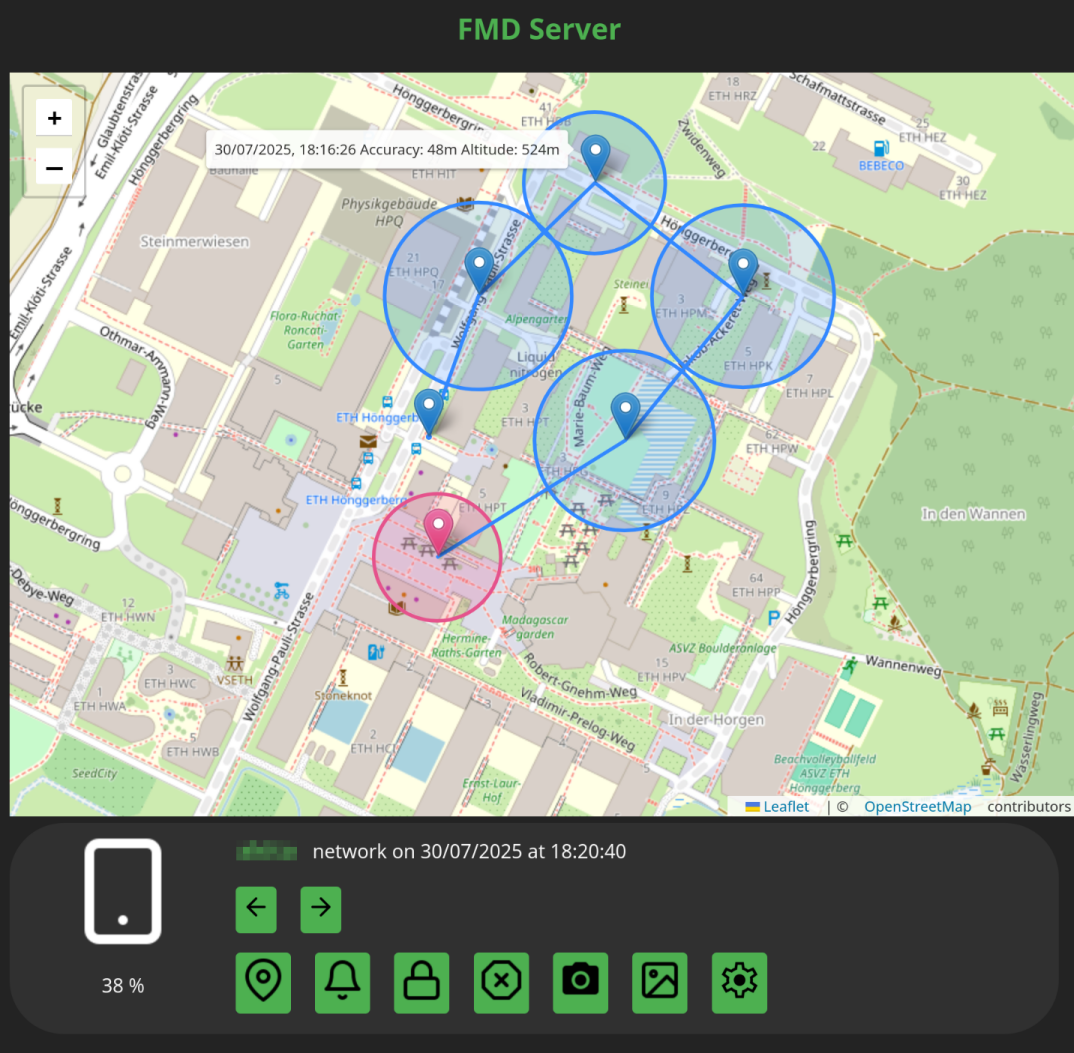
<p>In FMD Server, the accuracy is rendered as circles.
The other values are shown when you hover over a pin.
Note that in order to not overload the map, accuracy circles are only shown
for the selected location (shown in pink) and for five locations before and five after it.</p>
<p>And before you ask: yes, there is a <a href="https://gitlab.com/fmd-foss/fmd-android/-/issues/273#note_2478001967" target="_blank" rel="noopener noreferrer" class="">feature request</a>
to request a certain accuracy level from FMD.</p>
<p><img decoding="async" loading="lazy" alt="Screenshot of the FMD Server interface showing circles around the location pins" src="https://fmd-foss.org/assets/images/fmd-server-accuracy-circles-ce05cfb6d4d9cb3e537910e720ddb79b.png" width="1074" height="1053" class="img_XM6y"></p>
<h2 class="anchor anchorTargetStickyNavbar_iM01" id="beacondb">BeaconDB<a href="https://fmd-foss.org/blog/2025/10/03/release-android-0.12.0-server-0.12.0#beacondb" class="hash-link" aria-label="Direct link to BeaconDB" title="Direct link to BeaconDB" translate="no">​</a></h2>
<p>When you run <code>fmd locate cell</code>, FMD will now query not only <a href="https://opencellid.org/" target="_blank" rel="noopener noreferrer" class="">OpenCelliD</a>
but also <a href="https://beacondb.net/" target="_blank" rel="noopener noreferrer" class="">BeaconDB</a>.
This gives you another provider of cell-based locations.
Currently, FMD only sends the surrounding cellular networks to BeaconDB, but not the WiFi networks.</p>
<p>To contribute data to these databases,
use <a href="https://f-droid.org/packages/xyz.malkki.neostumbler.fdroid/" target="_blank" rel="noopener noreferrer" class="">NeoStumbler</a>
or <a href="https://f-droid.org/packages/info.zamojski.soft.towercollector/" target="_blank" rel="noopener noreferrer" class="">Tower Collector</a>.
These allow you to collect and upload data about the wireless networks around you, paired with a precise GPS location.
Later, apps like FMD can use this data to obtain a location estimate based on the wireless networks around them.</p>
<p>Note: due to a <a href="https://gitlab.com/fmd-foss/fmd-android/-/issues/361" target="_blank" rel="noopener noreferrer" class="">regression</a> in 0.12.0
that I found too late, cell locations can show data that is outdated by a few minutes or even hours.
Version 0.12.1 fixes this.</p>
<h2 class="anchor anchorTargetStickyNavbar_iM01" id="new-command-to-change-the-ringer-mode">New command to change the ringer mode<a href="https://fmd-foss.org/blog/2025/10/03/release-android-0.12.0-server-0.12.0#new-command-to-change-the-ringer-mode" class="hash-link" aria-label="Direct link to New command to change the ringer mode" title="Direct link to New command to change the ringer mode" translate="no">​</a></h2>
<p>FMD now has a new command: <code>fmd ringermode [normal | vibrate | silent ]</code>.
For example, this is useful if your phone is on silent but you want to give it a phone call.</p>
<h2 class="anchor anchorTargetStickyNavbar_iM01" id="custom-tile-server">Custom tile server<a href="https://fmd-foss.org/blog/2025/10/03/release-android-0.12.0-server-0.12.0#custom-tile-server" class="hash-link" aria-label="Direct link to Custom tile server" title="Direct link to Custom tile server" translate="no">​</a></h2>
<p>You can now configure the tile server in the <code>config.yml</code>,
thanks to a contribution by <a href="https://gitlab.com/wunderliebe" target="_blank" rel="noopener noreferrer" class="">Gert-Jan Braas</a>.</p>
<p>This allows server administrators to change the raster <a href="https://wiki.openstreetmap.org/wiki/Tile_servers" target="_blank" rel="noopener noreferrer" class="">tile server</a>
for the map on their self-hosted FMD Server.
Maybe you prefer one of the other <a href="https://wiki.openstreetmap.org/wiki/Raster_tile_providers" target="_blank" rel="noopener noreferrer" class="">available tile servers</a>,
or you want to use a self-hosted tile server.</p>
<h2 class="anchor anchorTargetStickyNavbar_iM01" id="prometheus-metrics-and-grafana-dashboard-template">Prometheus metrics and Grafana dashboard template<a href="https://fmd-foss.org/blog/2025/10/03/release-android-0.12.0-server-0.12.0#prometheus-metrics-and-grafana-dashboard-template" class="hash-link" aria-label="Direct link to Prometheus metrics and Grafana dashboard template" title="Direct link to Prometheus metrics and Grafana dashboard template" translate="no">​</a></h2>
<p>FMD Server now exposes a <code>/metrics</code> endpoint that can be scraped by <a href="https://prometheus.io/" target="_blank" rel="noopener noreferrer" class="">Prometheus</a>.
It contains some FMD Server-specific metrics, as well as some other system metrics that come from Prometheus' Go library.</p>
<p>By default, this endpoint only listens on localhost for security reasons.
You can change the address and port in the <code>config.yml</code>.
You will need to configure your networking so that your Prometheus scraper can securely reach this endpoint.
This is generic sysadmin task and is highly dependent on your setup.</p>
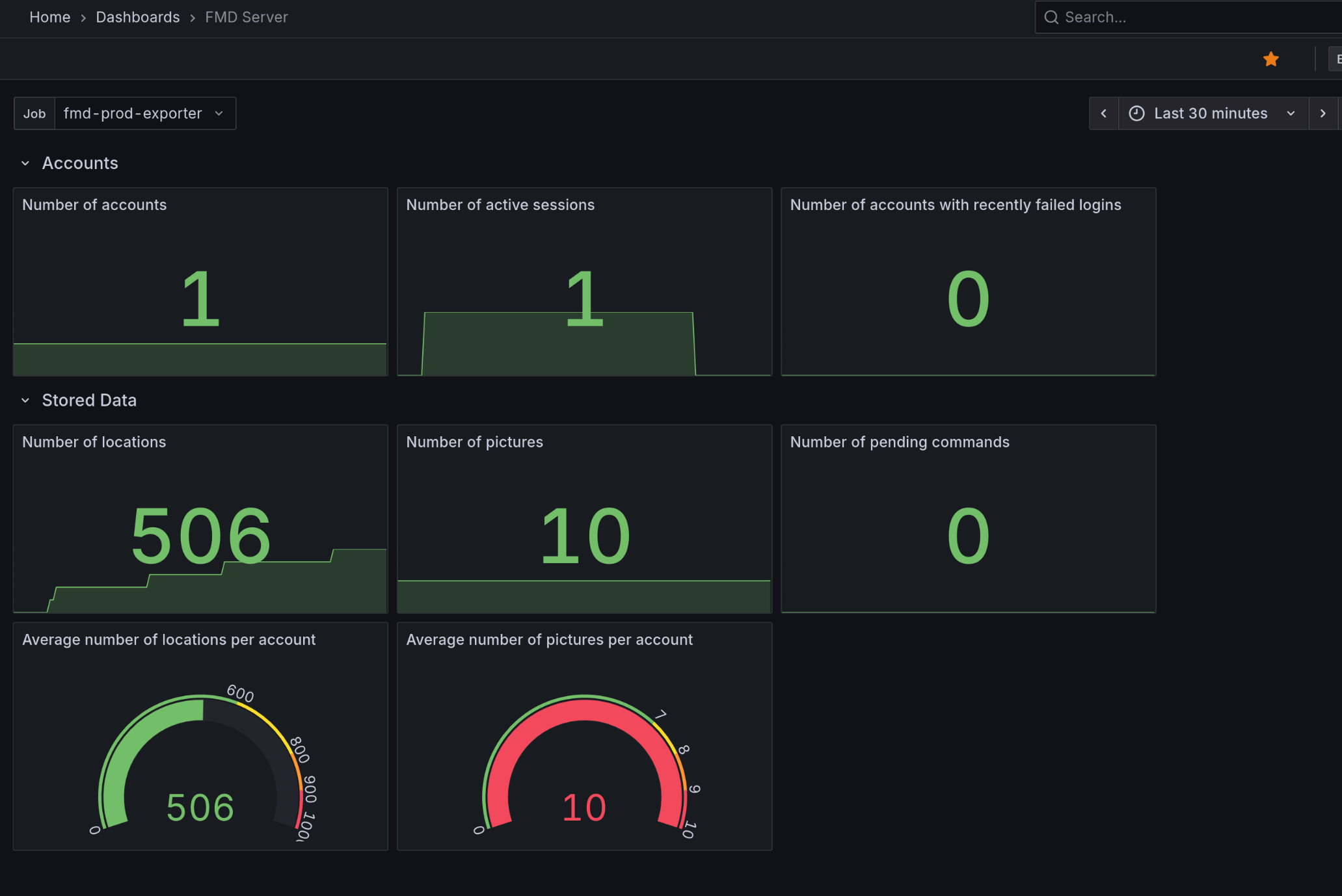
<p>There is also a <a href="https://gitlab.com/fmd-foss/fmd-server/-/blob/v0.12.0/grafana-template.json" target="_blank" rel="noopener noreferrer" class="">template</a>
for a Grafana dashboard that you can import and customise.
This is what it looks like on my personal FMD Server:</p>
<p><img decoding="async" loading="lazy" alt="Screenshot of the Grafana dashboard" src="https://fmd-foss.org/assets/images/fmd-server-grafana-dashboard-7eab6ec4e0f0f5ba8754927575cc45e0.png" width="2063" height="1378" class="img_XM6y"></p>
<h2 class="anchor anchorTargetStickyNavbar_iM01" id="security-improvements">Security improvements<a href="https://fmd-foss.org/blog/2025/10/03/release-android-0.12.0-server-0.12.0#security-improvements" class="hash-link" aria-label="Direct link to Security improvements" title="Direct link to Security improvements" translate="no">​</a></h2>
<p>FMD Android now requires that all connections to FMD Server are secured
by TLS certificates that are logged in <a href="https://certificate.transparency.dev/" target="_blank" rel="noopener noreferrer" class="">Certificate Transparency (CT)</a>.
This feature <a href="https://developer.android.com/privacy-and-security/security-config#CertificateTransparencySummary" target="_blank" rel="noopener noreferrer" class="">was introduced</a>
by Google in Android 16 and is therefore not available on older devices.</p>
<p><em>Edit:</em> The CT requirement was reverted for self-hosted servers in 0.13.0
in order to again allow using self-signed certificates.
CT is still enforced for nulide.de and fmd-foss.org.</p>
<p>Furthermore, for the publicly hosted server <a href="https://fmd.nulide.de/" target="_blank" rel="noopener noreferrer" class="">fmd.nulide.de</a>,
FMD Android now <a href="https://gitlab.com/fmd-foss/fmd-android/-/blob/v0.12.0/app/src/main/res/xml/network_security_config.xml?ref_type=tags" target="_blank" rel="noopener noreferrer" class="">only accepts certificates</a>
signed by Let's Encrypt (by pinning their <a href="https://letsencrypt.org/certificates/" target="_blank" rel="noopener noreferrer" class="">root certificates</a>, ISRG Root X1 and X2).
If any other CA would now issue a certificate for fmd.nulide.de or any fmd-foss.org subdomain, the app will reject it.</p>
<p>Additionally, FMD Android now opts in to Arm Memory Tagging Extensions (MTE).
This is mostly a matter of best practice, since our code is Kotlin/Java.
To learn more about MTE, see <a href="https://thore.io/posts/2025/09/introduction-to-arm-memory-tagging-extensions/" target="_blank" rel="noopener noreferrer" class="">this post</a>
on my personal blog.</p>
<h2 class="anchor anchorTargetStickyNavbar_iM01" id="looking-ahead">Looking ahead<a href="https://fmd-foss.org/blog/2025/10/03/release-android-0.12.0-server-0.12.0#looking-ahead" class="hash-link" aria-label="Direct link to Looking ahead" title="Direct link to Looking ahead" translate="no">​</a></h2>
<p>As you may have noticed, these releases don't yet include any of the features
that are <a class="" href="https://fmd-foss.org/blog/2025/05/03/nlnet-funding">funded by NLnet</a>.
We are well aware of that, and we are working on it!
After all, we would get money if we completed them :)</p>
<p>For now, enjoy these new releases of FMD!</p>]]></content>
        <author>
            <name>Thore</name>
            <uri>https://thore.io</uri>
        </author>
        <category label="android" term="android"/>
        <category label="server" term="server"/>
    </entry>
    <entry>
        <title type="html"><![CDATA[NLnet is funding FMD]]></title>
        <id>https://fmd-foss.org/blog/2025/05/03/nlnet-funding</id>
        <link href="https://fmd-foss.org/blog/2025/05/03/nlnet-funding"/>
        <updated>2025-05-03T00:00:00.000Z</updated>
        <summary type="html"><![CDATA[We are happy to announce that we received a grant from NLnet to support our continued work on FMD.]]></summary>
        <content type="html"><![CDATA[<p>We are happy to announce that we received <a href="https://nlnet.nl/project/FMD" target="_blank" rel="noopener noreferrer" class="">a grant</a> from NLnet to support our continued work on FMD.
This is part of the <a href="https://nlnet.nl/mobifree" target="_blank" rel="noopener noreferrer" class="">NGI Mobifree fund</a>.</p>
<p><del>We will add more details on what we are planning to work on once the project plan has been finalised!</del></p>
<p><em>Update (2025-06-05):</em>
All the paper work is done and we have agreed with NLnet on a project plan.
This plan outlines the items we plan to work on that will be funded by NLnet.
Here is the plan:</p>
<h2 class="anchor anchorTargetStickyNavbar_iM01" id="project-plan">Project plan<a href="https://fmd-foss.org/blog/2025/05/03/nlnet-funding#project-plan" class="hash-link" aria-label="Direct link to Project plan" title="Direct link to Project plan" translate="no">​</a></h2>
<h3 class="anchor anchorTargetStickyNavbar_iM01" id="1-publish-dev-signed-apks">1. Publish dev-signed APKs<a href="https://fmd-foss.org/blog/2025/05/03/nlnet-funding#1-publish-dev-signed-apks" class="hash-link" aria-label="Direct link to 1. Publish dev-signed APKs" title="Direct link to 1. Publish dev-signed APKs" translate="no">​</a></h3>
<p>Currently, FMD Android is published only on F-Droid and is signed by F-Droid.
Users have asked us to provide releases outside of F-Droid.
Thus we need to sign and publish APKs ourselves.</p>
<p>Most importantly, we need to organise key management and key backup among the FMD maintainers.
As an output of this, we want to write documentation on our processes for other FOSS maintainers to reuse.</p>
<p>Issue: <a href="https://gitlab.com/fmd-foss/fmd-android/-/issues/228" target="_blank" rel="noopener noreferrer" class="">https://gitlab.com/fmd-foss/fmd-android/-/issues/228</a></p>
<h3 class="anchor anchorTargetStickyNavbar_iM01" id="2-set-up-a-custom-f-droid-repo">2. Set up a custom F-Droid repo<a href="https://fmd-foss.org/blog/2025/05/03/nlnet-funding#2-set-up-a-custom-f-droid-repo" class="hash-link" aria-label="Direct link to 2. Set up a custom F-Droid repo" title="Direct link to 2. Set up a custom F-Droid repo" translate="no">​</a></h3>
<p>Currently, FMD Android is published only on F-Droid's main repo.
Due to F-Droid's long update cycle (2-5 days), releases are slow.
We want to host our own repo that users can add to their F-Droid client.
This will allow users to get faster updates.</p>
<p>Signing our own APK releases is a prerequisite for this.</p>
<h3 class="anchor anchorTargetStickyNavbar_iM01" id="3-package-fmd-server-for-more-platforms">3. Package FMD Server for more platforms<a href="https://fmd-foss.org/blog/2025/05/03/nlnet-funding#3-package-fmd-server-for-more-platforms" class="hash-link" aria-label="Direct link to 3. Package FMD Server for more platforms" title="Direct link to 3. Package FMD Server for more platforms" translate="no">​</a></h3>
<p>Currently, FMD Server is officially available as a Docker image. There is community AUR package.
We would like to also package FMD Server for multiple other platforms to make it more accessible and easier to self-host.
This includes Debian (.deb) and Snap.</p>
<p>This also needs key management between maintainers, which we can re-use from Task 1 (signing APKs).</p>
<h3 class="anchor anchorTargetStickyNavbar_iM01" id="4-redesign-fmd-servers-rest-api">4. Redesign FMD Server's REST API<a href="https://fmd-foss.org/blog/2025/05/03/nlnet-funding#4-redesign-fmd-servers-rest-api" class="hash-link" aria-label="Direct link to 4. Redesign FMD Server's REST API" title="Direct link to 4. Redesign FMD Server's REST API" translate="no">​</a></h3>
<p>The current API has grown over time, with many patches added to it, and no documentation.
It can hardly be called "REST" anymore.
For example, uploading a location is done by <code>POST /api/v1/location</code> and getting a location is done via <code>PUT /api/v1/location</code>.
As part of the redesign, we will create a proper specification using OpenAPI.</p>
<p>Issue: <a href="https://gitlab.com/fmd-foss/fmd-server/-/issues/40" target="_blank" rel="noopener noreferrer" class="">https://gitlab.com/fmd-foss/fmd-server/-/issues/40</a></p>
<h3 class="anchor anchorTargetStickyNavbar_iM01" id="5-manually-delete-individual-pictureslocations">5. Manually delete individual pictures/locations<a href="https://fmd-foss.org/blog/2025/05/03/nlnet-funding#5-manually-delete-individual-pictureslocations" class="hash-link" aria-label="Direct link to 5. Manually delete individual pictures/locations" title="Direct link to 5. Manually delete individual pictures/locations" translate="no">​</a></h3>
<p>Currently, there is no way to delete individual data from FMD Server.
You can only delete your entire account.
Even though this data is stored encrypted, we still want to add the ability to delete individual data points from the server.</p>
<p>Issue: <a href="https://gitlab.com/fmd-foss/fmd-android/-/issues/250" target="_blank" rel="noopener noreferrer" class="">https://gitlab.com/fmd-foss/fmd-android/-/issues/250</a></p>
<h3 class="anchor anchorTargetStickyNavbar_iM01" id="6-make-background-execution-on-android-more-reliable">6. Make background execution on Android more reliable<a href="https://fmd-foss.org/blog/2025/05/03/nlnet-funding#6-make-background-execution-on-android-more-reliable" class="hash-link" aria-label="Direct link to 6. Make background execution on Android more reliable" title="Direct link to 6. Make background execution on Android more reliable" translate="no">​</a></h3>
<p>Currently, when FMD Android receives a command, it uses the JobScheduler API to execute the work in the background.
This currently works for vanilla AOSP.
Unfortunately, on non-vanilla AOSP jobs don't execute completely or not at all.
Even Vanilla AOSP is becoming more restrictive about background location access by rate-limiting them.</p>
<p>Therefore, we plan to rewrite the command execution job to a foreground service to make it more reliable.</p>
<h3 class="anchor anchorTargetStickyNavbar_iM01" id="7-fine-grained-permission-control">7. Fine-grained permission control<a href="https://fmd-foss.org/blog/2025/05/03/nlnet-funding#7-fine-grained-permission-control" class="hash-link" aria-label="Direct link to 7. Fine-grained permission control" title="Direct link to 7. Fine-grained permission control" translate="no">​</a></h3>
<p>When you add a phone number/PIN/server account in the Android app, this grants it access to all commands that FMD offers.
This is too powerful. We want to implement permissions.
These will allow users to grant phone numbers/PINs permissions to execute only certain commands.
For example, to only run "locate" and "ring", but not "wipe".</p>
<p>Issue: <a href="https://gitlab.com/fmd-foss/fmd-android/-/issues/277" target="_blank" rel="noopener noreferrer" class="">https://gitlab.com/fmd-foss/fmd-android/-/issues/277</a></p>
<h2 class="anchor anchorTargetStickyNavbar_iM01" id="next-steps">Next steps<a href="https://fmd-foss.org/blog/2025/05/03/nlnet-funding#next-steps" class="hash-link" aria-label="Direct link to Next steps" title="Direct link to Next steps" translate="no">​</a></h2>
<p>The items in this plan are in no particular order, and there is no strict timeline either.
We are going to continue to work on FMD as a side project, at our own pace,
working on the things that we think make the most sense.
We will likely work on the project plan out-of-order.
Importantly, we will continue to work on non-funded items, as new bugs and feature requests come in.</p>
<p>NLnet promising funding (in legal terms, as donations) for the work items above is a great motivation,
and we are happy and honored by the trust they are placing in us.</p>
<p>Nulide and Thore, the FMD mainainers.</p>]]></content>
        <author>
            <name>The FMD Team</name>
            <uri>https://fmd-foss.org</uri>
        </author>
        <category label="funding" term="funding"/>
    </entry>
</feed>